
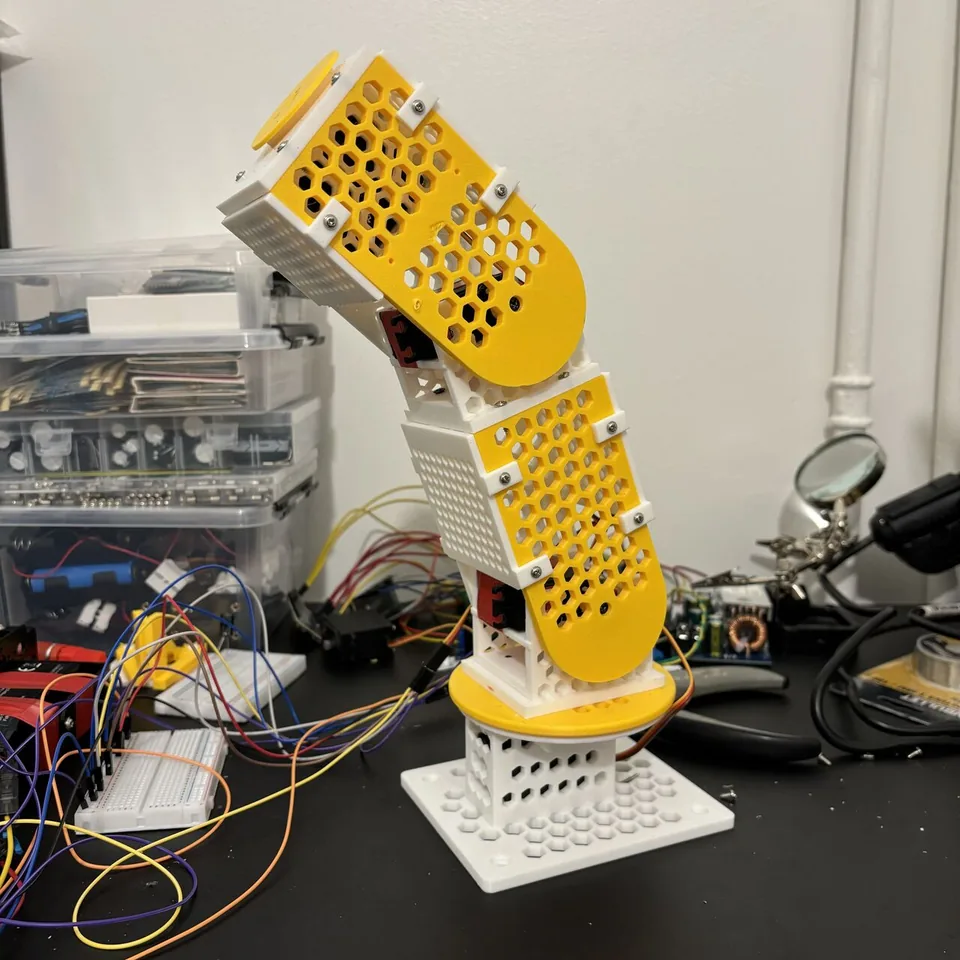
This is my first robotic arm and my first project with a 3D printer. I designed the parts in FreeCAD with help from Claude Code, printed and assembled them, and added an ESP32 controller. A Python program on my laptop now combines voice commands with a webcam image to choose movements for the arm.
Starting with the mechanical design#
I wanted to build an arm, but I had very little CAD experience. Writing the geometry as a FreeCAD Python macro gave me a way to work through it: describe a part, generate it, look at the result, and adjust the dimensions.
Claude Code helped write the macro. FreeCAD's Part workbench builds the shapes from solids, cuts, and unions, and a small reload script updates the model while I work on it. The main macro generates the assembly, so related dimensions can be changed together.
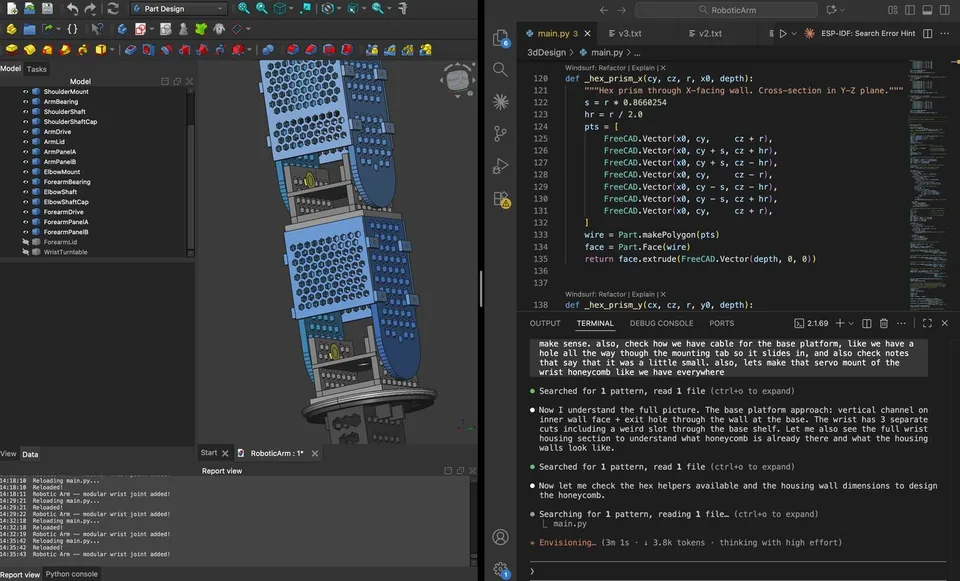
The design uses MG996R servos inside printed housings, with honeycomb openings in the larger plates and walls. I needed space for the servo body, mounting tabs, horn, screws, and cable, as well as enough clearance for the neighbouring part to move.
One small detail affects several parts: the servo shaft is offset from the centre of its body. The base housing and turntable have to be positioned around the shaft, rather than simply centring every shape on the servo case.
The CAD model includes a gripper assembly, but the first physical build and the current controller use four servos: base rotation, shoulder, elbow, and wrist rotation. The gripper is still separate work. Calling the assembled version a complete five-axis arm would get ahead of what I have running.
What happened when I printed it#
The first round took about 30 hours across design, printing, and assembly. It moved, but several parts needed changes once I could hold them and fit them together:
- Two servo mounts did not hold properly, so I used tape for the first test.
- I glued one lid because I did not have screws long enough for it.
- One wall blocked rotation and had to be shortened.
- The bottom turntable needed a reprint because the shaft arrangement left it sitting too high.
- A joint intended to print already assembled came out fused together. I replaced it with a separate shaft and retaining cap.
The shaft-and-cap arrangement is now represented in the CAD. At the shoulder, for example, the design uses a 7.6 mm shaft in an 8 mm bore. That makes the intended clearance explicit, although the printed fit still depends on the printer and material.
Getting the first assembly moving was satisfying. It also gave me a much more useful list of changes than I could get from looking at the model alone: better mounting tabs, accessible screws, room for the cables, and clearances checked through the full movement.
The ESP32 controller#
The firmware controls four servos on GPIO4–7. It keeps a current angle and a target angle for each one, then moves the current value toward the target on a 20 ms tick.
The movement uses interpolation rather than jumping directly to the requested value:
float difference = targetAngles[i] - currentAngles[i];
float speed = LERP_SPEED + abs(difference) / 800.0f;
currentAngles[i] += difference * speed;
This makes changes less abrupt in the prototype. The values called “current angles” are the controller's estimates of what it has commanded; the ESP32 does not receive measured joint positions from the servos.
The home values are 90°, 80°, 75°, and 90°. The base and wrist are limited to 30–150°, the shoulder to 80–160°, and the elbow to 75–160°. Both the Python serial layer and the firmware constrain individual angle commands to those ranges.
A small OLED shows the current and target values. A touch input toggles a mode that detaches the servo outputs so I can reposition the arm by hand. The firmware also has a sequence of poses for a dance routine.
Talking to it from the laptop#
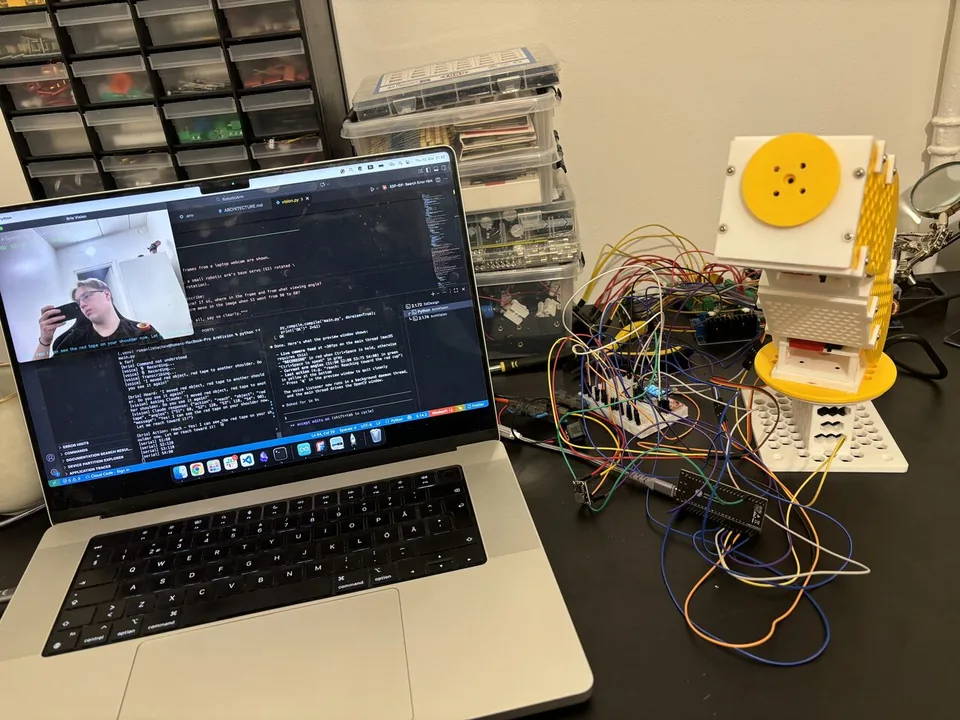
The Python controller is called Brio. I hold Ctrl+Space to record a command, then release it to send. Whisper transcribes the audio locally, and OpenCV supplies a 640×480 webcam frame.
The transcription, image, and last commanded servo angles go to Claude through the API. Claude returns a JSON action, and the Python program sends the corresponding commands to the ESP32 over USB serial.
Voice + webcam snapshot
          |
          v
Local Whisper transcription
          |
          v
Claude: text, image, arm state
          |
          v
JSON action on the laptop
          |
          v
USB serial -> ESP32 -> servos
The live camera preview stays on the main thread, which is needed for the OpenCV window in this macOS setup. Voice handling runs in the background. If the serial connection is unavailable, angle commands are logged instead, so I can inspect the interaction without moving the arm.
How the current vision controller chooses a movement#
The current prompt asks Claude to estimate servo angles for both a reach and an expressive movement. For a reach, it returns the object name and an angles object. For other requests it can return move, dance, home, stop, search, or unknown.
At startup, the controller takes a picture at home, rotates the base from 90° to 60°, and takes another. It asks Claude to describe how the arm moved in the image. That description is included in later requests as a rough hint about the camera's position.
This is a visual hint, rather than a measured camera calibration. It does not calculate a camera matrix or establish a precise mapping from pixels to millimetres.
If Claude cannot find the requested object, search moves the arm home to clear the view and captures another image. The loop has a bounded number of attempts. Once it gets a movement action, the controller sends it without checking a new image during that movement.
The inverse-kinematics experiment#
There is also an earlier local inverse-kinematics solver in the project. It takes a target position in millimetres, uses the horizontal bearing for the base, and solves the shoulder and elbow as a two-link arm. The wrist stays at its home angle.
The solver uses the law of cosines for the elbow and derives the shoulder angle from the target elevation and elbow bend. It rejects targets too close to the shoulder and limits distant targets to a position near the arm's maximum reach.
That solver is not called by the current voice-and-vision controller. The active path uses the angles returned by Claude. I want to keep that distinction clear because the two approaches have different limitations: a geometric solver needs a calibrated target position, while direct angle estimates from an image are approximate from the start.
The serial protocol#
The controller uses a small text protocol at 115,200 baud:
S1:90
S2:110
S3:100
S4:90
Each line sets one servo's target. The Python layer spaces these commands by 50 ms and protects serial writes with a lock. That keeps individual writes intact, but it does not make a whole movement sequence atomic; overlapping voice actions can still interleave.
The firmware handles dance and stop itself. In this version, stop cancels the dance and sets the home pose as the next target. It is not an immediate freeze or a power cut, so the name is worth improving before the controller becomes more complicated.
What I want to improve next#
The arm can move and respond to commands, but it cannot yet grab objects or correct a movement from live feedback. Its angle limits also do not check whether a path would hit the table, the arm itself, or something nearby.
The next mechanical work is finishing the gripper and replacing the temporary mounting fixes. On the control side, I want a proper movement queue, a clear stop behaviour, and measured camera-to-arm calibration.
After that, I can compare the geometric solver with the current direct-angle approach and add an image check after a move. A faster vision API on its own would not provide that feedback loop; the controller also needs to decide when to observe again, how to judge the result, and whether another movement is appropriate.