Building a robotic arm with Claude Code, FreeCAD, and Claude Vision
On this page 7 sections
Designing, printing, and controlling my first robotic arm#
Updated project notes: the Lab article now covers the current four-servo controller, its startup camera check, and the difference between the earlier IK experiment and the active direct-angle approach. This post records the first build.
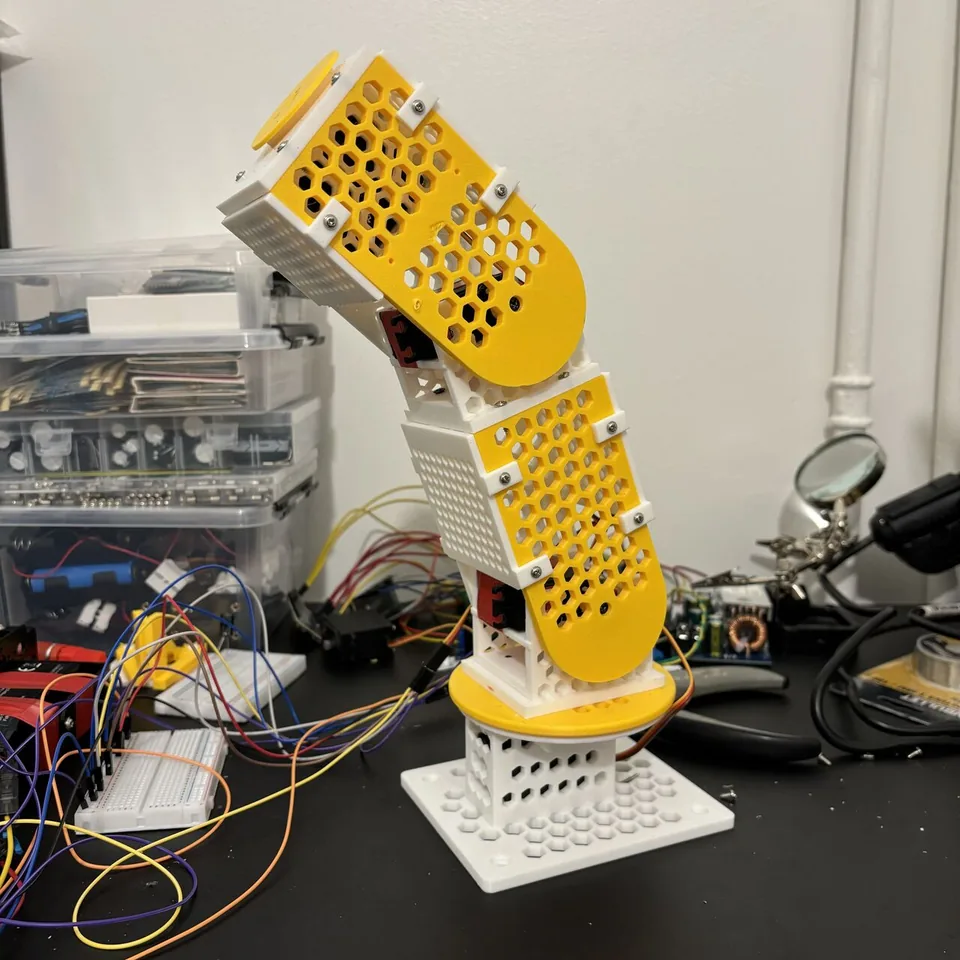
I wanted a robotic arm. I had close to zero CAD experience and had never used a 3D printer. So I wired Claude Code into FreeCAD, prompted my way through the design, printed the parts, assembled them, and then gave the arm vision and voice control via the Claude API.
It's a v1 — works, has rough edges, and taught me 3D printing along the way. Here's how it came together.
Part 1: using Claude Code for 3D CAD design#
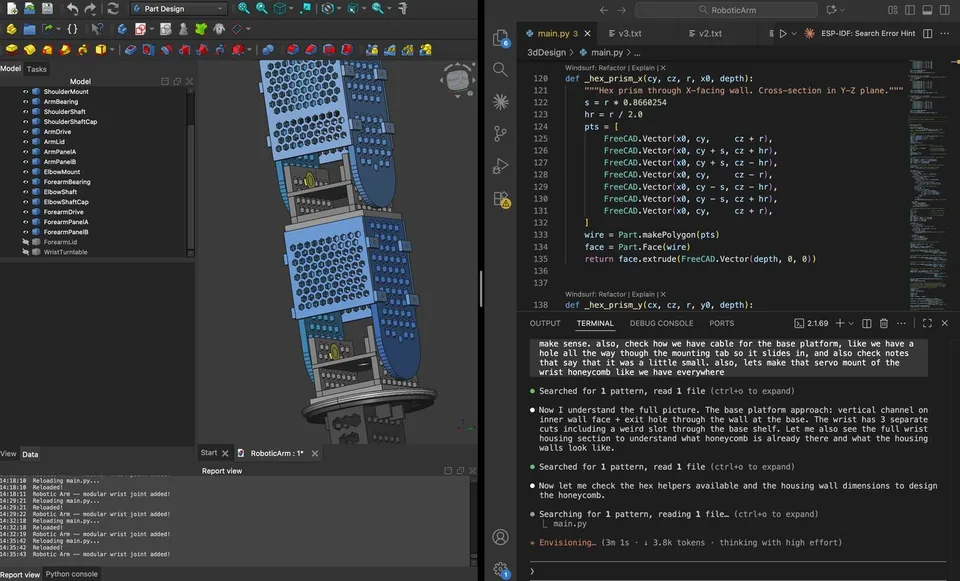
The first problem was the CAD. I'm building a servo-based arm, but I have effectively no CAD skills. So I built a workaround: FreeCAD + Python + Claude Code.
Claude Code writes the Python geometry, FreeCAD watches the script and renders in real time. I describe what I need, iterate through conversation, and export to print. The whole arm is one macro — every part comes out of a single main.py against the FreeCAD Part workbench, using boolean CSG operations.
The design is 5-DOF (two base turntables, shoulder, elbow, wrist, plus a planned gripper) built around MG996R servos fully enclosed inside the structural parts. Honeycomb lightening throughout — hex pockets in plates, flanges, and walls — to keep print times sane and parts rigid where they need to be.
One quirk worth knowing: FreeCAD's macro runner chokes on Unicode, so the entire script is ASCII-only. No em-dashes, no degree symbols, no arrows in comments.
It's not magic. You still need to think through dimensions, tolerances, and how parts actually fit together. But the barrier from idea to printable part dropped massively. Some parts came off the printer and went straight onto the arm.
Part 2: assembling the first version#
About 30 hours total — design, print, assemble. Four of the five servos are wired up: two turntables and two joints. Rotates and bends in all directions as expected. Gripper is still on the to-print list.
Here's how the first build turned out:
- 4 servos working (2 turntables + 2 joints) — rotates and bends in all directions as expected
- Had to tape 2 servos — mounting tabs weren't holding them properly
- Glued one lid — didn't have long enough screws
- Cut one wall that was blocking rotation — couple cm too long
- Reprinted the bottom turntable — shaft was too long, the whole thing was basically levitating on a bolt
- Print-in-place hinge failed (offsets too small, printed solid) — replaced with a regular shaft
This was also my first time ever using a 3D printer, which deserves its own footnote.
Honestly satisfied for a first build. A few fixes for v1.1 — bigger servo housings, proper screws instead of glue, better mounting tabs — but the core thing works.
Part 3: giving it vision and voice#
Wanted the simplest possible way to make the arm recognise and react to real objects. Here's what I built:
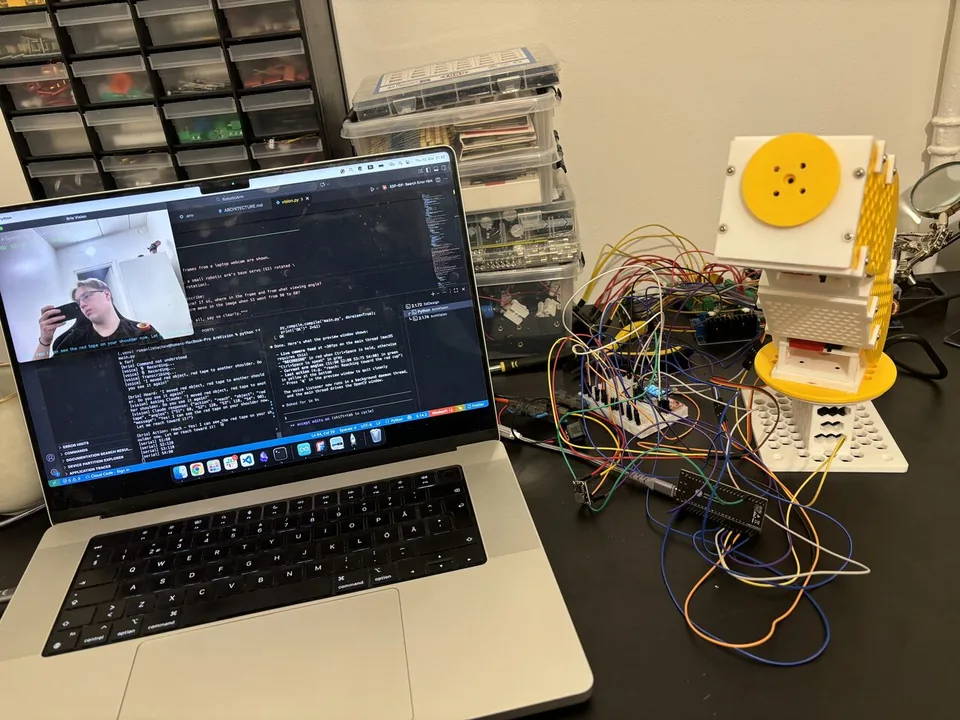
A Python controller running on my laptop holds the loop. Whisper (the base model, ~139MB, running locally on CPU) does push-to-talk speech-to-text on the spacebar. OpenCV grabs a 640×480 frame from the webcam at the moment I release the key. Both go to the Claude Vision API alongside the arm's current servo angles. Claude returns a structured JSON action — what to do, where, and how — and the controller dispatches it to the ESP32 over serial. The arm moves.
It worked on the first try.
One nice DX detail: if the ESP32 isn't plugged in, the controller falls back to a "dry run" mode that just logs the commands it would have sent. Lets me iterate on the brain without unplugging cables.
How it decides what to do#
The interesting design choice is how Claude and the local code split responsibility. Claude doesn't directly drive the servos for spatial tasks — it identifies what and where in pixel coordinates, and the local math layer figures out the geometry.
The system prompt locks Claude into a strict JSON schema with six action types:
reach— Claude returnspixel_x, pixel_yof the target object; the local IK pipeline does the rest. ("touch the red cup", "point at the ball")move— Claude returns raw servo angles directly. Used for expressive gestures it has freedom over. ("wave hello", "nod")dance,home,stop— single-action commandsunknown— fallback for nonsense inputsearch— if Claude can't see the object, it asks the controller to clear the view (go home) and try again with a fresh frame
So Claude is the creative brain for expression and the perception layer for finding things, but it doesn't pretend to do trigonometry. The math is in code, where it belongs.
Pixel → world → servo angles#
For reach, the local code converts a pixel coordinate into a 3D point and then into servo angles.
Pixel → world. Pixels are normalised to [-1, 1] against workspace bounds (300mm wide × 250mm deep). A camera-tilt correction term — tan(tilt_angle) against the 30° downward camera tilt — compensates for the fact that objects lower in the frame are physically further away. Z is fixed at table height for now. The whole conversion is deliberately approximate; the code literally has a "calibrate later" comment.
World → angles. Classic two-link planar IK using the law of cosines:
- S1 (base turntable) is just
atan2(y, x)mapped to servo space - S2 + S3 (shoulder + elbow) treat the arm as a 2-link mechanism in the vertical plane — elbow angle from the law of cosines, shoulder angle by geometric decomposition (
α − β) - S4 (wrist) currently stays at home — no rotation logic yet
Two design choices I like: when a target is out of reach, it doesn't fail — it clamps to 97% of max reach and stretches toward the target. Every angle is clamped against per-servo limits before it is sent. Those limits restrict individual angles; they do not check the path for collisions.
Current limitations#
- No gripper yet — the arm approaches objects but can't grab.
- No feedback loop — only the initial image is sent, so motion is one-shot approximation. Adding feedback would require repeated observations and controller logic that checks the result before moving again.
- Camera is on the laptop with a hardcoded position — no real spatial connection to the arm.
All three are solvable.
Next up#
Mounting the camera on the arm itself so the spatial frame travels with the gripper. Swapping to a streaming-vision API so the arm can correct mid-move. Printing the gripper. Calibrating the pixel-to-world conversion properly instead of the current "good enough" approximation.
→ Project page: Robotic arm v1.