
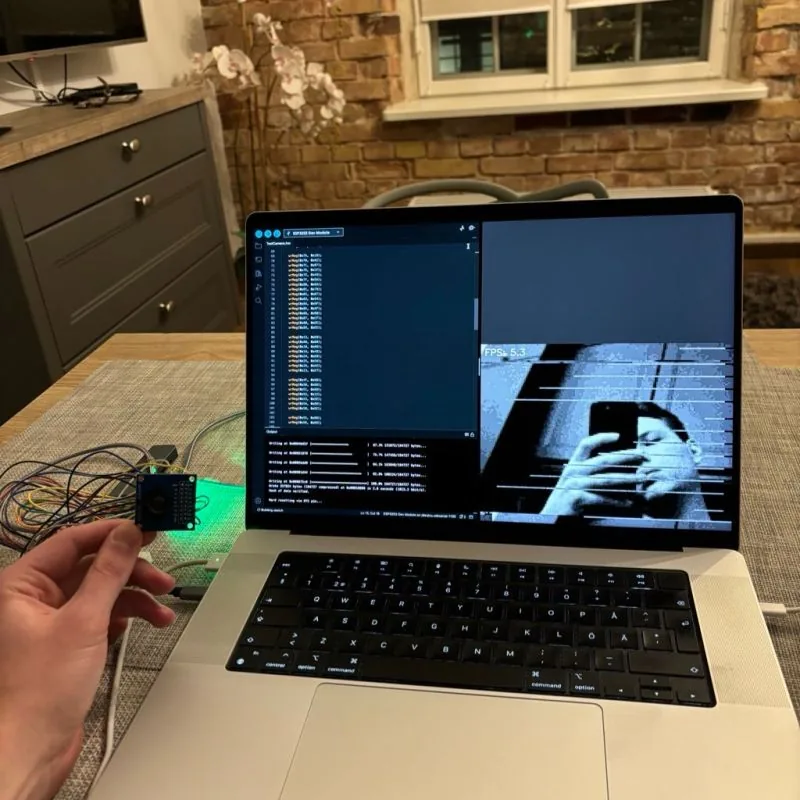
I connected an OV7670 camera to an ESP32-S3 and wrote the capture code myself. The result was a 160×120 grayscale stream at about 5 frames per second in my original bench test. This became the camera input for my hand-gesture and motor experiment.
Why I started with this camera#
I wanted to understand how a small camera sends an image to a microcontroller. The OV7670 was cheap enough to experiment with, and its interface gave me plenty to figure out: a parallel data bus, several timing signals, and a set of registers that control the output.
I used Arduino for the board setup, serial connection, and register writes. The part I wrote from scratch was the camera configuration and capture loop, rather than using an existing camera driver.
That meant I could follow a frame all the way from a change on a pin to a picture on my laptop.
The connections#
The ESP32 supplies the camera's external clock, configures it through its SCCB control interface using Wire, and reads the image through GPIO. These are the signal pins in the working viewer sketch:
| Camera signal | ESP32-S3 GPIO | What it does |
|---|---|---|
| SIOD | 5 | Register data |
| SIOC | 4 | Register clock |
| XCLK | 15 | Clock sent to the camera |
| PCLK | 13 | Clock received with the image data |
| VSYNC | 6 | Frame timing |
| HREF | 7 | Row timing |
| D4 | 12 | Image data bit 4 |
| D5 | 18 | Image data bit 5 |
| D6 | 17 | Image data bit 6 |
| D7 | 16 | Image data bit 7 |
| PWDN | 21 | Held low during operation |
| RESET | 47 | Held high after setup |
The module uses the board's 3.3 V supply and a shared ground. I only connected the upper four image-data bits; the lower four are unused in this capture path.
XCLK and PCLK are separate signals. The sketch generates a 20 MHz XCLK, but that does not mean it captures a complete pixel every 50 nanoseconds. The camera's configuration determines the output timing, and each retained grayscale sample also involves skipping a byte. Keeping those clocks separate in my head made the capture code much easier to reason about.
Configuring the output#
The setup resets the camera, writes the format and scaling registers, then applies the exposure, gain, and image-adjustment settings. The output is reduced to 160×120, which is small enough to buffer and send over serial.
The image format was one of the confusing parts. This configuration uses the luminance information from the camera's YUV output. The capture loop reads one byte and skips the next, retaining the upper four bits of each luminance sample.
That gives 16 brightness levels. It loses detail, but it was enough to see my hand and other objects clearly. It also let me keep the wiring and stored frame smaller while I was getting the timing working.
Reading a frame#
The capture function first waits for a frame boundary on VSYNC. For each of the 120 rows, it waits for HREF, samples the data in step with PCLK, and then waits for the row to end.
The inner loop reads the GPIO input register directly:
while (!(REG_READ(GPIO_IN_REG) & PCLK_MASK))
    ;
uint32_t gpio = REG_READ(GPIO_IN_REG);
while (REG_READ(GPIO_IN_REG) & PCLK_MASK)
    ;
That one register snapshot contains all four data bits. The code masks them out afterwards, rather than making a separate digitalRead() call for each pin. The function also has IRAM_ATTR so the capture code is placed in internal RAM.
The difficult part was getting the register settings and read sequence to agree. A frame can have the expected number of bytes and still be wrong because the sampling started on the wrong byte or lost alignment with a row. Seeing the actual image was more helpful than simply knowing that data was arriving.
The current loop waits for signal changes without an explicit timeout. If the camera stops producing a clock or a sync signal, capture can block. Adding bounded waits and a clear capture error is still something I would improve before relying on this driver in a longer-running device.
Packing the image#
Two four-bit pixels fit into one byte. A 160×120 image therefore needs 9,600 bytes, rather than 19,200 bytes for one byte per pixel.
The first pixel goes in the high nibble and the second goes in the low nibble. On the laptop, the viewer reverses that operation:
packed = np.frombuffer(data, dtype=np.uint8)
pixels = np.stack([
    (packed >> 4) & 0x0F,
    packed & 0x0F,
], axis=1).flatten()
frame = (pixels * 17).astype(np.uint8).reshape(h, w)
Multiplying by 17 maps the values 0–15 to 0–255 for display. It does not restore the brightness detail discarded at capture; it spreads the 16 retained levels across the display range.
Getting it onto the laptop#
The serial connection is configured for 2,000,000 baud. Each frame has a small header followed by the packed pixels:
AA 55 | width | height | packed image
 2 B  |  1 B  |  1 B   | 9,600 B
The Python viewer looks for the two sync bytes, checks the dimensions, reads the payload, and displays it through OpenCV. Sending s toggles streaming. The viewer sends that command when it opens and again when it closes.
I enlarge the image to 640×480 with nearest-neighbour scaling. That keeps the captured pixels visible, which is useful for spotting missing rows, noise, and byte-order mistakes. The FPS overlay measures the rate of received frames, including the capture and transfer work.
This is a simple development protocol. It has no checksum or frame counter, so the receiver cannot reliably distinguish every damaged frame from a valid one. Those would be useful additions if I wanted to record long sessions or investigate occasional transfer errors.
What I took into the next build#
The original result was about 5 FPS with a recognizable grayscale image. It gave me a working capture path, a viewer, and a way to save images from the same camera that would later run inference.
That last part mattered for the gesture-controlled motor. I could collect training pictures with the OV7670 itself, including its limited brightness levels and noise, instead of training on cleaner images from a different camera.
For another revision, I would start with capture timeouts and better frame diagnostics. A hardware-assisted capture path would be worth exploring after that, especially if I wanted to do more work on the ESP32 while a frame was arriving.