
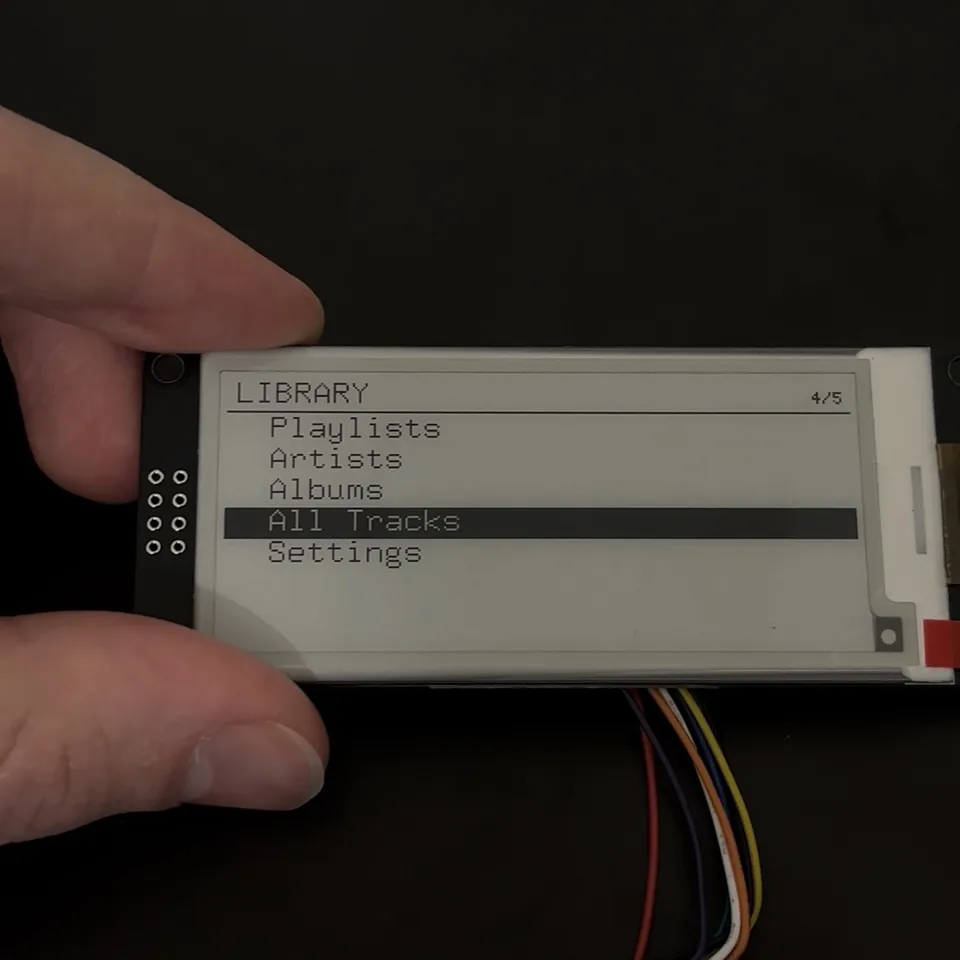
MusicStation v2 is the continuation of MusicStation v1. V1 followed the music playing on my iPhone. V2 moves the library, artwork, lyrics, playlists, controls, and playback state onto the device itself. The interface is now running on the real e-paper hardware; the remaining physical work is the amplifier, speakers, and a 3D-printed enclosure.
The firmware, wiring notes, card format, interface design, and preparation tools are open source in the MusicStation V2 repository. The display is also listed on the Parts I use page.
Why I rebuilt it instead of extending v1#
V1 was designed around an iPhone. Bluetooth supplied the track state, Wi-Fi supplied artwork and lyrics, and the phone supplied the audio. That was useful because I could develop the screen with real music before building a complete player.
V2 has almost the opposite architecture. The ESP32-S3 owns the library and playback state. The microSD card holds the MP3 files, synchronized lyrics, prepared artwork, playlists, and the index used for browsing. Physical buttons replace the phone as the interface.
Trying to turn V1 into that system one conditional at a time would have left two unrelated products sharing the same main loop. I kept V1 working in the repository root and started V2 as a separate sketch with small modules for storage, indexing, input, UI, playback, and audio.
The e-paper work was worth carrying over. The quiet-border display driver, UTF-8 rendering, lyric layout, text fitting, and partial-refresh strategy all came from the first version.
What v2 does now#
The current prototype boots into a local library interface on the 296×128 e-paper display. It can mount a card, create or reopen an index, browse artists and albums, list all tracks, open playlists, and navigate settings with five buttons.
For each track, the firmware can load a prepared 96×96 album cover and a synchronized .lrc lyric file from the card. The player model handles queues, previous and next, play and pause, shuffle, repeat, saved position, and automatic track advance.
Until the amplifier is installed, the default audio backend uses a simulated playhead. The clock advances, lyrics change, progress moves, and the queue reaches the next track without producing sound. The real MP3 and I²S path is already separated behind the same interface.
FAT32 microSD card
  MP3 + LRC + artwork + playlists
                 |
                 v
             ESP32-S3  <---- five buttons
                 |
                 +---- SSD1680 e-paper
                 |
                 +---- I²S ---- MAX98357A ---- speakers
                                  next step
What changed from v1#
| Area | MusicStation v1 | MusicStation v2 |
|---|---|---|
| Music source | iPhone | MP3 files on microSD |
| Track metadata | Apple Media Service | Card folders and local index |
| Artwork | iTunes JPEG downloaded at runtime | Prepared one-bit bitmap |
| Lyrics | LRCLIB over HTTPS | Local .lrc sidecar |
| Controls | Phone and BLE media reports | Five physical buttons |
| Network | BLE and Wi-Fi | None during use |
| Audio | Phone speakers | I²S path for MAX98357A |
| Browsing | Whatever the phone is playing | Artists, albums, tracks, playlists |
Removing the network stack simplified some parts and created new problems elsewhere. V2 no longer needs BLE pairing, TLS, JSON, JPEG decoding, or asynchronous web requests. It now needs a filesystem, a scalable library index, responsive button handling, and an audio path that can keep reading while the e-paper display is busy.
Hardware#
The current build uses:
- ESP32-S3 board based on ESP32-S3-WROOM-1U
- WeAct Studio 2.9-inch black-and-white e-paper module
- DEPG0290BS 296×128 panel with SSD1680 controller
- microSD breakout connected in one-bit SDIO mode
- five tactile buttons: Up, Down, Enter, Back, and Menu
- FAT32 microSD card containing the prepared music library
The next hardware is a MAX98357A I²S amplifier and speakers. After that, the electronics need a 3D-printed enclosure.
Wiring#
The display keeps the V1 pin map. The labels SDA and SCL on the WeAct board are SPI data and clock, despite looking like I²C names.
| Part | Signal | ESP32-S3 pin |
|---|---|---|
| E-paper | BUSY | GPIO7 |
| E-paper | RESET | GPIO8 |
| E-paper | D/C | GPIO9 |
| E-paper | CS | GPIO10 |
| E-paper | MOSI, labelled SDA | GPIO11 |
| E-paper | SCK, labelled SCL | GPIO12 |
| microSD | CLK | GPIO38 |
| microSD | CMD | GPIO39 |
| microSD | DAT0 | GPIO40 |
| Up button | Active low | GPIO4 |
| Down button | Active low | GPIO5 |
| Enter button | Active low | GPIO6 |
| Back button | Active low | GPIO15 |
| Menu button | Active low | GPIO16 |
The card uses the ESP32-S3's SDMMC peripheral in one-bit mode. That needs only clock, command, and data 0. The buttons connect between their GPIO and ground and use the internal pull-ups.
The reserved audio pins are GPIO17 for bit clock, GPIO18 for left/right clock, GPIO21 for data, and GPIO2 for amplifier shutdown. The MAX98357A logic accepts 3.3 V signals; its power rail can use 5 V for more speaker output.
#define I2S_BCLK 17
#define I2S_LRCLK 18
#define I2S_DIN 21
#define AMP_SD 2
Software and build settings#
The verified toolchain in the V2 notes is:
| Component | Version |
|---|---|
| Arduino ESP32 core | 3.2.1 |
| GxEPD2 | 1.6.9 |
| Adafruit GFX | 1.12.6 |
| U8g2_for_Adafruit_GFX | 1.8.0 |
| ESP8266Audio | 2.4.1 for the hardware audio build |
The board profile uses USB CDC on boot, the Huge APP partition, and PSRAM disabled for the tested board. V2 does not need ArduinoJson, JPEGDEC, Wi-Fi, BLE, or the TLS stack used by V1.
Both audio configurations were compiled while the architecture was being developed:
| Build | Flash | Global RAM | Free for locals |
|---|---|---|---|
| Simulated playhead | 586,414 bytes, 18% | 30,604 bytes, 9% | 297,076 bytes |
| MP3 and I²S path | 727,598 bytes, 23% | 30,804 bytes, 9% | 296,876 bytes |
| V1 for comparison | 1,757,650 bytes | 85,160 bytes | — |
That difference is one of the main reasons for the rewrite. Audio decoding needs dependable internal memory. Removing BLE, Wi-Fi, TLS, JSON, and runtime JPEG work leaves far more room than trying to fit another subsystem beside V1.
Source layout#
The V2 sketch is split by responsibility instead of keeping the whole project in one .ino file.
| File | Responsibility |
|---|---|
MusicStationV2.ino |
Boot, self-test, event loop, render selection |
pins.h |
Physical pin map |
panel.cpp |
Display driver, fonts, refresh accounting |
input.cpp |
Interrupt queue, debounce, holds, auto-repeat |
storage.cpp |
SDIO mount and card locking |
library.cpp |
Card scan and fixed-width index |
mp3meta.cpp |
MP3 frame and duration parsing |
lyrics.cpp |
LRC parsing and current-line lookup |
cover.cpp |
Prepared one-bit artwork loading |
playlist.cpp |
M3U reading and editing |
player.cpp |
Queue, shuffle, repeat, resume, track changes |
audio.cpp |
Simulated and hardware audio backends |
settings.cpp |
NVS-backed settings and resume state |
power.cpp |
Sleep, wake, and battery hooks |
ui.cpp |
Navigation and every screen |
This also makes the boundary around unfinished hardware clear. The rest of the program talks to audioPlay(), audioPause(), and audioPositionMs(). It does not care whether the position comes from a silent clock or an MP3 decoder.
The microSD card is the source of truth#
The folder layout is meant to stay understandable outside the device:
/Music/Artist/Album/01 Track.mp3
/Music/Artist/Album/01 Track.lrc
/Music/Artist/Album/cover.bin
/Music/Artist/Album/cover_full.bin
/Music/Artist/Album/album.txt
/Playlists/Favourites.m3u
/.station/                         generated index
Artist and album names come from the folders. A leading number in the filename supplies the track order. Lyrics share the MP3 basename, so the path to a lyric file can be derived without a database lookup. The cover belongs to the album directory.
Playlists use normal M3U files containing track paths. This keeps the card portable and means a playlist entry does not need a second proprietary metadata format.
The /.station folder belongs to the device. It can be deleted safely; the firmware rebuilds it from /Music.
Why FAT32#
The card is formatted as FAT32 because support is predictable in the Arduino ESP32 stack. It also works easily with macOS, Windows, Linux, and inexpensive USB card readers.
I prepare the library with the card outside the device. A reader is much faster than adding a USB transfer protocol to the firmware, and it keeps file management separate from playback.
Preparing an album on a computer#
The repository includes tools/prepare_album.py. It takes a folder of music and writes the structure expected by V2.
python3 tools/prepare_album.py ~/Music/Pablo-Honey \
  --dest /Volumes/MUSIC
The script reads tags where available, normalizes filenames, copies or converts audio, looks up synchronized lyrics, obtains cover art, and prepares monochrome bitmap files at the exact dimensions used by the display.
Network work still exists, but it happens once on the computer while preparing the card. The player itself does not need a hotspot or external service during use.
For a folder with poor or missing tags, artist and album can be supplied explicitly. A dry run shows what would be written before touching the card.
python3 tools/prepare_album.py ~/Downloads/album \
  --dest /Volumes/MUSIC \
  --artist "Radiohead" \
  --album "Pablo Honey" \
  --dry-run
The companion make_playlist.py tool builds M3U files from tracks already on the card. The firmware can then browse those playlists using the same path-based player queue as an album.
Building an index that does not grow in RAM#
Scanning every folder whenever a list opens would be slow. Loading the entire library into C++ objects would make RAM usage grow with the collection. V2 builds an on-card index instead.
The index contains separate files for strings, tracks, albums, and artists. Each numeric record has a fixed width:
struct __attribute__((packed)) TrackRecord {
  uint32_t pathOffset;
  uint32_t titleOffset;
  uint16_t artistIndex;
  uint16_t albumIndex;
  uint16_t trackNumber;
  uint16_t durationSeconds;
  uint32_t fileSize;
  uint32_t modifiedTime;
  uint8_t flags;
  uint8_t reserved[7];
};

static_assert(sizeof(TrackRecord) == 32);
Because record 500 always starts at 500 × sizeof(record), the UI can seek directly to a row. It only needs the seven visible rows in memory. Artist and album records point to contiguous ranges of albums and tracks, so browsing does not need secondary maps.
The library is capped at 65,535 tracks by its 16-bit indices. That is far beyond the practical capacity of the card and keeps every record small.
Writing the header last#
The index header contains a magic value, format version, source-card information, and record counts. It is written only after the record files are complete.
If power is lost halfway through a scan, there is no valid header claiming the partial files are usable. On the next boot, the firmware rebuilds them.
The index version is deliberately bumped when a bug changes the meaning of stored records. Old files are then treated as stale instead of silently carrying incorrect durations into the player.
Reading MP3 duration without decoding the track#
The library needs duration for the progress bar, track list, lyric scheduler, and simulated playhead. Decoding every MP3 during a card scan would be excessive.
mp3meta.cpp skips an ID3v2 header, searches for the first valid MPEG Layer III frame, and reads the bitrate and sample information. A Xing or Info header provides the frame count for variable-bitrate files. Constant-bitrate files can use bitrate and file size as a fallback.
The result is stored once in the track record. Opening a list later becomes a small index read rather than another MP3 inspection.
Moving from SPI to one-bit SDIO#
The first card implementation used SPI. Directory listings and small reads worked, which made it appear healthy, but files larger than 1,024 bytes failed when the filesystem attempted a multi-block read. That affected every MP3, every cover, and many lyric files.
The current storage layer uses SD_MMC in one-bit mode on the same three signal wires:
if (!CARD.setPins(SD_CLK, SD_CMD, SD_DAT0)) {
  return false;
}

CARD.begin("/sdcard", true, false, SDMMC_FREQ_DEFAULT, 16);
One practical trap is that an SD card placed into SPI mode can stay there until it loses power. Switching firmware to SDIO may still fail after a board reset; reseating or power-cycling the card clears that state.
The open-file limit looked like bad metadata#
The index keeps four files open while it scans: strings, tracks, albums, and artists. The default filesystem limit allowed too few additional handles for directory traversal and MP3 inspection.
The scan still found tracks, but attempts to open audio files failed and their durations became zero. Raising the limit to 16 fixed the cause. The storage diagnostics now report how many simultaneous opens actually work so this failure is visible at bring-up.
Designing a library for a 296×128 screen#
The panel can show seven list rows below a small header. The selected row is an inverted full-width band, and the top right displays position such as 4/5.
+--------------------------------------------+
| LIBRARY                              4/5   |
+--------------------------------------------+
|   Playlists                                |
|   Artists                                  |
|   Albums                                   |
|###All Tracks###############################|
|   Settings                                 |
+--------------------------------------------+
The library root opens playlists, artists, albums, all tracks, and settings. Artist screens open albums; album screens open tracks. Selecting a track replaces the player queue with the relevant album, artist, playlist, or whole library and starts at that row.
Long lists support fast scrolling and a letter jump. The player does not need to animate through every intermediate row; it updates its selection immediately and draws after the input settles.
Five buttons instead of a touchscreen#
The controls are:
| Button | Now playing | Lists |
|---|---|---|
| Up | Previous track | Move up |
| Down | Next track | Move down |
| Enter | Play or pause | Open or play |
| Back | Open library | Go up one level |
| Back held | — | Return to now playing |
| Menu | Track actions | Context actions or letter jump |
The buttons are intentionally ordinary tactile switches. A press gives physical feedback while the e-paper is still refreshing. With a capacitive control, silence during the refresh would make a second accidental press more likely.
Capturing presses during a display refresh#
An e-paper update can block the main loop for around 780 ms. Polling the pins only from loop() would lose presses during that time.
Each GPIO interrupt records a small edge event into a 32-entry ring buffer. The interrupt does not navigate the UI or touch the display. The main loop later converts raw edges into press, release, hold, and repeat events.
struct RawEdge {
  uint8_t action;
  bool pressed;
  uint32_t at;
};

constexpr uint8_t RAW_QUEUE_SIZE = 32;
volatile RawEdge rawEdges[RAW_QUEUE_SIZE];
Debounce is tracked per button, so pressing two different buttons close together does not suppress the second one. Only Up and Down repeat. Enter and Back do not repeat because one long press should not open several screens or walk out of the whole menu tree.
Letting fast input outrun the screen#
After 450 ms, Up and Down repeat every 90 ms. After 1.5 seconds they switch to page-at-a-time movement. The internal selection can move much faster than the panel.
Rendering waits for 150 ms of quiet after the latest input. A burst of ten moves can therefore cost one visible refresh. This feels much better than forcing the user to wait for the display after every row.
The now-playing screen#
The main player layout stays close to V1 because it already fits the panel well:
+---------------------------------------------------------+
| title                                      artist       |
| album                                                   |
+--------------------+------------------------------------+
|                    |                                    |
|     96×96 art      |       current lyric               |
|                    |       up to three lines            |
|                    |                                    |
+--------------------+------------------------------------+
|                    | elapsed    play/pause    remaining |
|                    | progress bar                       |
+--------------------+------------------------------------+
The artwork begins at x=4. The right column begins at x=104 and is 184 pixels wide. Both values align to whole bytes in the controller's memory, which keeps partial windows predictable.
The list interface is new, but the player screen reuses V1's UTF-8 fonts, text fitting, lyric wrapping, cover dimensions, transport layout, and quiet-border partial refreshes.
Local artwork instead of JPEG decoding#
V1 downloaded a JPEG, decoded it, sharpened it, changed its contrast, and dithered it on the ESP32. V2 moves that work to the preparation script.
The card stores a small MSBM file containing a ten-byte header and packed one-bit rows. The loader checks the magic value, version, width, height, and required buffer size before accepting it.
if (memcmp(header, "MSBM", 4) != 0 || header[4] != 1) {
  return false;
}

uint16_t width = header[6] | (header[7] << 8);
uint16_t height = header[8] | (header[9] << 8);
A normal cover is 96×96, so its pixels occupy 1,152 bytes. The firmware can read that directly into the display-ready buffer. There is no JPEG decoder and no second full image needed during a track change.
Local synchronized lyrics#
Lyrics sit next to the track with the same basename:
02 Creep.mp3
02 Creep.lrc
The parser supports timestamps such as [00:42.35], several timestamps on one line, and the LRC [offset:] tag. Empty timed lines are kept because they intentionally clear the screen during an instrumental gap.
Text is stored once in a shared arena. Each lyric record keeps its timestamp, offset, and length. Multi-timestamp lines are sorted after parsing because their entries can arrive out of playback order.
During normal playback, the lookup advances from the current lyric rather than searching the whole list every time. A seek or track change falls back to binary search. The requested time includes an 800 ms lead so the e-paper waveform finishes near the moment the line is sung.
Missing lyrics are a normal state. The screen can distinguish no file, an unreadable file, an oversized file, and a file that contains text but no synchronized timestamps.
One queue for every source#
The player has one queue abstraction. Playing an album, artist, playlist, or all tracks means building a queue and selecting a position inside it.
That gives previous, next, repeat, shuffle, resume, and automatic advance one implementation instead of four related versions.
Shuffle uses a seeded Fisher–Yates permutation. The selected track stays at the front when shuffle begins, and the seed is saved. Restoring after a restart recreates the same order, so Previous still means something and the display does not return to a different song.
Previous restarts the current track when playback is more than three seconds in. Near the beginning it moves to the preceding queue item, matching the behaviour people already expect from music players.
Saving playback state#
The device stores the queue source, source context, playlist path, queue position, elapsed time, shuffle state and seed, repeat mode, volume, and sleep timeout in NVS.
Writing flash on every progress update would be unnecessary wear. State saves are throttled during playback and forced at meaningful transitions such as pause or track change.
This matters more with e-paper than with a normal screen. The panel continues showing the previous frame without power. Restoring the same track and queue prevents the screen from visually disagreeing with the player after a restart.
Simulating playback before adding sound#
The default backend is selected with one compile-time flag:
#ifndef AUDIO_HARDWARE
#define AUDIO_HARDWARE 0
#endif
With hardware disabled, audioPlay() records the duration and start time. The rest of the device receives a real-looking position, end-of-track event, pause state, and seek result.
This is more useful than a placeholder function. It exercises the player queue, lyric scheduler, progress bar, resume state, button actions, and display refreshes while the amplifier is absent.
The real audio path#
With AUDIO_HARDWARE set to 1, the backend opens the MP3 from the card, feeds it through a 32 KB compressed-data buffer, decodes it with ESP8266Audio, and sends mono I²S to the reserved MAX98357A pins.
Compressed buffering gives more time per byte than buffering decoded PCM. At 128 kbps, 32 KB represents roughly two seconds of audio—enough to cover the approximately 780 ms e-paper waveform and temporary card contention.
The decoder task runs on core 0. The Arduino loop and panel rendering stay on core 1. A display refresh should therefore block the UI core without starving MP3 decoding.
xTaskCreatePinnedToCore(
  decoderLoop,
  "mp3",
  8192,
  nullptr,
  2,
  &decoderTask,
  0
);
The amplifier shutdown pin provides a clean mute during track changes, seeks, pause, and sleep. The output is mixed to mono in software before reaching the amplifier.
One toolchain problem before audio bring-up#
ESP8266Audio 2.4.1 includes a PDM source file that does not compile against the tested ESP32 core because it refers to an IDF field that no longer exists. V2 uses I²S, not PDM, so that unrelated file can be disabled in the Arduino library installation.
This does not affect the simulated build. It matters when compiling the real audio backend and is documented in the V2 README so it does not look like a MusicStation source error.
Sharing the card between the UI and decoder#
Once audio is enabled, the decoder reads MP3 data on one core while the UI may read index rows, lyrics, covers, or playlists on the other. The Arduino filesystem layer is not assumed to be thread-safe.
Every card transfer uses a recursive mutex through a small StorageGuard object:
class StorageGuard {
public:
  StorageGuard() : locked(storageLock()) {}
  ~StorageGuard() {
    if (locked) storageUnlock();
  }
  explicit operator bool() const { return locked; }
private:
  bool locked;
};
The destructor releases the lock even when a function returns early. The lock surrounds the transfer rather than a long stretch of UI work, leaving the decoder buffer to absorb short waits.
E-paper refresh strategy#
V2 keeps separate regions for the whole screen, lyric column, and transport strip. A track change redraws the player. A lyric change updates the right column. A position or play-state change updates the small transport region.
The main loop collects one-shot flags from the player:
bool lyricChanged = playerTakeLyricChanged();
bool transportChanged = playerTakeTransportChanged();
bool trackChanged = playerTakeTrackChanged();
It then picks the smallest region that contains the changed content. A smaller region does not make the SSD1680 waveform dramatically faster, but it avoids driving unchanged artwork and text again.
Partial refreshes accumulate a weighted cost. When the budget reaches the equivalent of about 25 whole-screen partial updates, the panel receives a full cleanup waveform to reduce ghosting.
The custom quiet-border driver also keeps the physical border electrode in a high-impedance state during partial updates. That work came directly from the dark-border problem in V1.
The main loop#
The loop remains deliberately cooperative:
- Drain button events.
- Retry or rescan the card if requested.
- Advance the player and lyric state.
- Wait until input has settled.
- Draw the smallest required display region.
- Check the sleep policy.
Input changes model state immediately. Rendering happens later. This separation is what lets the controls stay responsive even though the display itself is slow.
The bring-up mode uses the same pattern. Holding Back at boot opens a diagnostic screen that reports the display, card type and size, root entry count, each held button, event count, and partial-refresh count. Menu retries the card mount without reflashing the board.
Problems that shaped v2#
A healthy directory did not mean healthy file reads#
SPI could enumerate the card and read small data, while multi-block reads failed. Testing a known MP3 and reporting its first bytes exposed the difference between “mounted” and “actually usable.”
Track durations were all zero#
The MP3 parser was not necessarily wrong. The filesystem had run out of open handles while four index outputs and the directory scan were active. Increasing max_files fixed the upstream failure.
Resetting did not leave SPI mode#
An SD card can remember that it entered SPI mode until power is removed. After changing the firmware to SDIO, a board reset was insufficient; the card needed to be reseated.
Button presses vanished during refresh#
The waveform blocks the normal loop long enough to miss a quick press. GPIO interrupts and the edge queue keep those events until the loop returns.
Drawing every scroll step was unusable#
A list cannot wait almost a second for each held-button repeat. The current model allows selection to move quickly, coalesces the burst, and draws only the final state.
Runtime image work competed with audio memory#
V1 proved that JPEG decoding, TLS, BLE, and Wi-Fi could coexist, but the largest contiguous block was already the important measurement. Preparing artwork on a computer makes the memory budget for V2 much more predictable.
Building and loading it#
- Format a microSD card as FAT32.
- Prepare at least one album using
tools/prepare_album.py. - Wire the e-paper display, card, and five buttons using
V2/WIRING.mdandpins.h. - Install GxEPD2, Adafruit GFX, and U8g2 for Adafruit GFX.
- Open
V2/MusicStationV2/MusicStationV2.ino. - Select the ESP32-S3 profile, USB CDC on boot, Huge APP, and PSRAM disabled.
- Keep
AUDIO_HARDWAREat0until the amplifier is connected. - Compile, upload, and hold Back during boot if the hardware diagnostic screen is needed.
On a normal first boot, the station mounts the card and builds /.station. Later boots reopen the index unless the format version or source-card checks say it is stale. A manual rescan remains available from Settings.
Current limitations#
- The MAX98357A amplifier is not installed yet, so the current prototype runs its playback model silently.
- Speakers still need to be selected, mounted, and tested with the amplifier.
- The electronics do not yet have a 3D-printed enclosure.
What comes next#
The remaining build work is focused:
- Add the MAX98357A amplifier.
- Add the speakers.
- Design and print a 3D enclosure.
V1 proved the screen and the idea. V2 now has the local library and physical interface that make it feel like its own object. The next revision is the one that gives it sound and a body.