
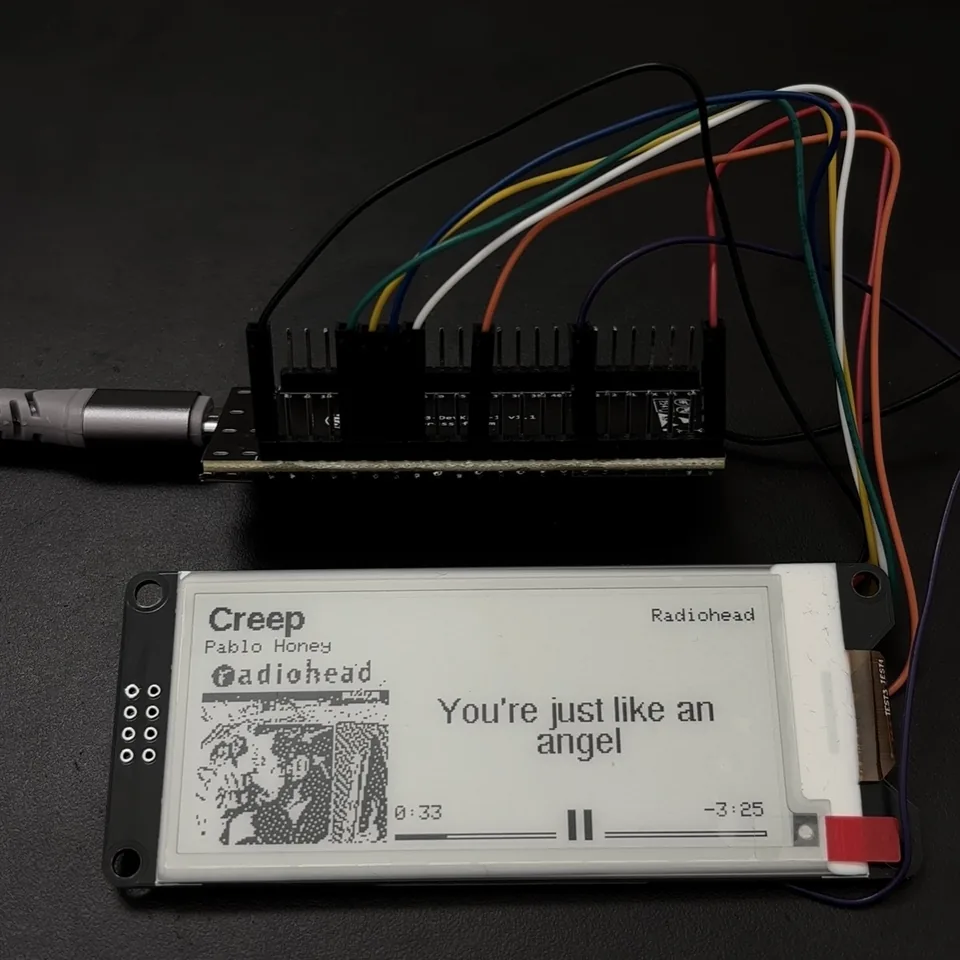
MusicStation v1 is an e-paper display for the music playing on my iPhone. It shows the track, album artwork, playback progress, and synchronized lyrics. I built this version around an ESP32-S3 to work through the display and Bluetooth side before adding the hardware for a standalone player.
The complete firmware is open source in the MusicStation repository. The display shown here is also listed on the Parts I use page, together with the affiliate disclosure and two short demo videos.
Why I started with the display#
I want to turn MusicStation into a small offline player with local music, physical buttons, and speakers. That involves several separate projects: playing audio, managing files, handling power, making an enclosure, and deciding what belongs on a very small screen.
For v1, I let the phone keep doing the audio playback. That gave me a way to test the screen with real songs while I worked on Bluetooth metadata, artwork, and lyrics. It also made the problems easier to separate: if a title was wrong or an image failed to load, I could investigate that without debugging audio at the same time.
The phone and network still do work that I eventually want the device to handle itself. This version gives me a screen and a way to try those ideas in the meantime.
What v1 does#
MusicStation pairs from the normal Bluetooth settings on an iPhone or iPad. Once the connection is encrypted, it subscribes to Apple Media Service and receives the current artist, album, title, duration, playback position and play/pause state.
The ESP32-S3 then joins Wi-Fi, searches for album artwork through the iTunes Search API, downloads a small JPEG, converts it into a sharpened one-bit image, and asks LRCLIB for synchronized lyrics. The final screen combines all of that on a 296×128 black-and-white panel.
The phone still plays the audio. MusicStation follows its playback state and updates the screen.
                         BLE HID pairing
                    + Apple Media Service
                              |
                              v
 iPhone playback  <------  ESP32-S3  ------>  iTunes Search API
                              |                     album art
                              |
                              +--------------->  LRCLIB
                              |                  synced lyrics
                              |
                              v
                     SSD1680 e-paper
                         over SPI
The longer-term version will replace the phone and network dependencies with microSD storage, local metadata, physical controls, I²S audio through a MAX98357A amplifier, speakers, power hardware and an enclosure.
Hardware#
The active prototype uses:
- ESP32-S3 board or module based on ESP32-S3-WROOM-1U
- External 2.4 GHz antenna for the
-1Umodule - WeAct Studio 2.9-inch black-and-white e-paper module
- DEPG0290BS 296×128 panel with an SSD1680 controller
The -1U part is easy to overlook. It is the external-antenna version of the module, so Bluetooth and Wi-Fi performance depend on having the antenna connected properly.
Display wiring#
The WeAct labels SDA and SCL can look like I²C, but this module is using four-wire SPI. SDA is MOSI and SCL is the clock.
| WeAct pin | ESP32-S3 pin | Purpose |
|---|---|---|
| VCC | 3V3 | Display power |
| GND | GND | Common ground |
| SDA | GPIO11 | SPI MOSI |
| SCL | GPIO12 | SPI clock |
| CS | GPIO10 | Chip select |
| D/C | GPIO9 | Data/command select |
| RES | GPIO8 | Display reset |
| BUSY | GPIO7 | Display busy output |
MISO is not used. The module is powered from 3.3 V and does not need a level shifter in this build.
The corresponding pin definitions in the sketch are:
#define EPD_SCK 12
#define EPD_MOSI 11
#define EPD_CS 10
#define EPD_DC 9
#define EPD_RST 8
#define EPD_BUSY 7

SPI.begin(EPD_SCK, -1, EPD_MOSI, EPD_CS);
Software and build settings#
The latest verified combination is:
| Component | Version |
|---|---|
| Arduino ESP32 core | 3.2.1 |
| GxEPD2 | 1.6.9 |
| Adafruit GFX | 1.12.6 |
| ArduinoJson | 7.4.2 |
| JPEGDEC | 1.8.4 |
| U8g2_for_Adafruit_GFX | 1.8.0 |
The working Arduino settings use a suitable ESP32-S3 board profile, the Huge APP partition, PSRAM disabled for the tested board, and USB CDC enabled on boot when serial diagnostics are needed.
Wi-Fi credentials live in a local config.h that is excluded from Git:
#pragma once

#define WIFI_SSID "YOUR_WIFI_NAME"
#define WIFI_PASS "YOUR_WIFI_PASSWORD"
Only config.example.h is published. The real credentials never belong in the sketch or repository.
Designing the 296×128 screen#
A 296×128 display sounds roomy until a 96×96 album cover takes most of its height. The final layout is built around fixed regions:
0                                                       295
+---------------------------------------------------------+
| title                                  artist           | 0..16
| album                                                   | 17..30
+--------------------+------------------------------------+
|                    |                                    |
|     96×96 art      |       current lyric               | 31..106
|                    |       up to three lines            |
|                    |                                    |
+--------------------+------------------------------------+
|                    | elapsed     play/pause    remaining| 107..122
|                    | progress bar                       | 123..127
+--------------------+------------------------------------+
The cover starts at (4, 31). The right column begins at x=104 and is 184 pixels wide:
constexpr int COVER_X = 4;
constexpr int COVER_Y = 31;
constexpr int COVER_SIZE = 96;

constexpr int RIGHT_X = 104;
constexpr int RIGHT_W = 184;
Those right-column values are byte-aligned. That is useful for predictable SSD1680 partial windows, and it lets the firmware update the lyric or transport area without driving the artwork pixels again.
Getting now-playing data from iOS#
Getting Apple Media Service, or AMS, working took more than finding a service UUID. I had to make the ESP32 appear as an accessory that iOS would pair with, then wait for the encrypted connection before looking for the media service.
MusicStation pairs through normal iOS settings. It displays a passkey on the e-paper screen, saves the bond, and starts AMS discovery after authentication.
Why the ESP32 advertises as a media remote#
An early prototype worked through a BLE utility. I wanted to pair it from the phone's normal settings, so I added a HID Consumer Control service. That gives iOS a media accessory it can recognize and reconnect to.
The report describes three future buttons: play/pause, next and previous.
static const uint8_t mediaReportMap[] = {
    0x05, 0x0C, // Usage Page (Consumer)
    0x09, 0x01, // Usage (Consumer Control)
    0xA1, 0x01, // Collection (Application)
    0x85, 0x01, // Report ID (1)
    0x15, 0x00, // Logical Minimum (0)
    0x25, 0x01, // Logical Maximum (1)
    0x75, 0x01, // Report Size (1)
    0x95, 0x03, // Report Count (3)
    0x09, 0xCD, // Play/Pause
    0x09, 0xB5, // Next track
    0x09, 0xB6, // Previous track
    0x81, 0x02,
    0x75, 0x05,
    0x95, 0x01,
    0x81, 0x03,
    0xC0
};
No physical buttons are wired in v1, so the report remains released. The important part is that it is a media remote rather than a keyboard; pairing it does not interfere with the iPhone's on-screen keyboard.
Soliciting AMS#
iOS does not simply expose AMS to every nearby BLE device. The accessory asks for it by putting the AMS UUID into the Service Solicitation section of its advertising packet.
The older Arduino BLE API does not provide a convenient helper for this exact advertising-data type, so the bytes are assembled manually:
#define AMS_SERVICE_UUID "89D3502B-0F36-433A-8EF4-C502AD55F8DC"

void addAmsSolicitation(BLEAdvertisementData &adv)
{
  BLEUUID uuid(AMS_SERVICE_UUID);
  String data;
  data.reserve(18);
  data += (char)17;
  data += (char)ESP_BLE_AD_TYPE_128SOL_SRV_UUID;
  data.concat((const char *)uuid.getNative()->uuid.uuid128, 16);
  adv.addData(data);
}
The primary advertising packet contains the HID service and AMS solicitation. The scan response carries the appearance and device name. Keeping the HID service in the primary packet was important: iOS filters what it considers a pairable system accessory before it has all optional scan-response data.
advertisement.setCompleteServices(BLEUUID((uint16_t)HID_SERVICE_UUID));
addAmsSolicitation(advertisement);

scanResponse.setAppearance(HID_GENERIC_APPEARANCE);
scanResponse.setName(DEVICE_NAME);
The legacy BLE advertising packet has a 31-byte limit, which is why those fields are split between the main packet and scan response.
Pairing and encryption order#
The security configuration asks for Secure Connections, man-in-the-middle protection and bonding. The ESP32 behaves as a display-only device, so the passkey appears on e-paper and is entered on the phone.
BLEDevice::setEncryptionLevel(ESP_BLE_SEC_ENCRYPT_MITM);

security.setAuthenticationMode(ESP_LE_AUTH_REQ_SC_MITM_BOND);
security.setCapability(ESP_IO_CAP_OUT);
security.setKeySize(16);
One failure mode was trying to start another encryption request while iOS pairing was already underway. Bluedroid rejected the overlap. The current code waits for the authentication callback, gives iOS another 500 ms to publish its post-encryption services, and only then starts AMS discovery.
The order of HID initialization also mattered. Calling battery notification code before the services were fully attached caused BLECharacteristic::notify() to assert on a null server pointer and reboot the ESP32. The fixed order is:
- Create the HID device.
- Populate manufacturer, PnP and HID information.
- Install the report map and input report.
- Start HID services.
- Set the battery level.
Sharing one physical BLE connection#
The iPhone initiates the HID connection because the ESP32 is advertising as a peripheral. After encryption, the firmware creates a GATT client interface that shares that physical connection and discovers AMS on the phone.
bool startAmsClient()
{
  if (!client)
  {
    client = BLEDevice::createClient();
    if (!client->connect(phoneAddress))
      return false;
  }

  client->getServices(); // force fresh post-auth discovery
  BLERemoteService *ams = client->getService(AMS_SERVICE_UUID);
  if (!ams)
    return false;

  BLERemoteCharacteristic *entityUpdate =
      ams->getCharacteristic(AMS_ENTITY_UPDATE_UUID);
  if (!entityUpdate)
    return false;

  entityUpdate->registerForNotify(onEntityUpdate);

  uint8_t playerSub[] = {ENTITY_PLAYER, PLAYER_ATTR_PLAYBACK_INFO};
  uint8_t trackSub[] = {
      ENTITY_TRACK,
      TRACK_ATTR_ARTIST,
      TRACK_ATTR_ALBUM,
      TRACK_ATTR_TITLE,
      TRACK_ATTR_DURATION
  };

  entityUpdate->writeValue(playerSub, sizeof(playerSub), true);
  entityUpdate->writeValue(trackSub, sizeof(trackSub), true);
  return true;
}
Service discovery is deliberately refreshed on every retry. A cached service list collected before encryption may not include AMS yet.
Parsing AMS notifications safely#
AMS notifications arrive outside the normal Arduino loop task. Updating String objects from that callback while the renderer reads them is a race, and allocation from a BLE callback makes heap behavior harder to reason about.
The current callback does bounded, allocation-free work. It copies values into a fixed-size inbox and marks dirty bits inside a short critical section:
constexpr size_t AMS_TEXT_CAPACITY = 192;

struct AmsInbox
{
  char artist[AMS_TEXT_CAPACITY];
  char album[AMS_TEXT_CAPACITY];
  char title[AMS_TEXT_CAPACITY];
  float duration;
  float elapsed;
  float rate;
  int state;
  unsigned long elapsedAtMs;
  uint32_t trackGeneration;
  uint8_t dirty;
};

AmsInbox amsInbox = {};
portMUX_TYPE amsInboxMux = portMUX_INITIALIZER_UNLOCKED;
The callback parses the compact AMS header—entity, attribute and flags—then copies only the payload:
void onEntityUpdate(BLERemoteCharacteristic *, uint8_t *data,
                    size_t len, bool)
{
  if (len < 3)
    return;

  uint8_t entity = data[0];
  uint8_t attr = data[1];
  char value[192];
  size_t count = min(len - 3, sizeof(value) - 1);
  memcpy(value, data + 3, count);
  value[count] = 0;

  // Parse and copy into amsInbox under a short critical section.
  // Canonical Strings and display state are not touched here.
}
loop() takes a snapshot of the inbox, clears its dirty mask, and becomes the only owner of the canonical NowPlaying state. That division fixed intermittent corruption and made track transitions deterministic.
Reconstructing elapsed time locally#
AMS does not need to send a notification every second. It publishes a playback position, rate and timestamp. MusicStation extrapolates from that anchor:
float currentElapsed()
{
  float value = np.elapsed;
  if (np.state == 1)
    value += np.rate * (millis() - np.elapsedAtMs) / 1000.0f;
  if (np.duration > 0 && value > np.duration)
    value = np.duration;
  return value < 0 ? 0 : value;
}
Seeking or a new AMS playback notification resets the anchor. This keeps the progress bar moving without Bluetooth traffic every second.
Track identity and stale requests#
AMS publishes artist, album, title and duration as separate notifications. If the firmware starts a lookup as soon as the title changes, it can accidentally search for the new title with the previous artist.
MusicStation handles that in three layers:
- Every metadata change increments a generation number.
- A track key hashes artist, title, album and rounded duration.
- Network work waits 1.5 seconds for the separate AMS fields to settle.
Cover and lyric functions capture the current generation before they start. They check it again between expensive stages and throw away their result if the user has already skipped to another track.
bool trackRequestIsCurrent(uint32_t generation)
{
  return generation != 0 &&
         latestPublishedTrackGeneration() == generation;
}
This is what prevents an old JPEG or lyric response from appearing over the next song.
Why Wi-Fi starts late#
BLE, Wi-Fi and TLS all compete for radio time and internal memory. V1 intentionally completes HID pairing and AMS discovery before it starts joining Wi-Fi.
if (amsReady && np.haveTrack && !wifiStarted)
{
  wifiStarted = true;
  lastWifiTry = millis();
  WiFi.begin(WIFI_SSID, WIFI_PASS);
}
I kept Wi-Fi out of the initial pairing sequence to reduce the work happening at the same time. The board also waits until it has a track before joining the network to look for artwork and lyrics.
The active setup often uses the same iPhone for playback and Personal Hotspot. The ESP32-S3 needs a reachable 2.4 GHz network; enabling Maximize Compatibility on the iPhone can help when the hotspot is otherwise not visible to the board.
If the hotspot appears after boot, MusicStation retries every 15 seconds in the background. A late reconnection clears the attempted-generation markers so artwork and lyrics can be fetched again.
HTTP and the current TLS compromise#
Network requests are synchronous in v1. That keeps the ownership model simple, but it makes heap peaks important because BLE remains alive while TLS, JSON and JPEG code run.
The current prototype calls setInsecure() on WiFiClientSecure. Traffic is encrypted, but the server certificate is not authenticated. A later revision needs certificate verification that fits the device.
HTTP/1.0 is requested to avoid chunked response bodies, and download storage is allocated only after the TLS connection succeeds:
WiFiClientSecure secureClient;
secureClient.setInsecure();

HTTPClient http;
http.useHTTP10(true);
http.setTimeout(15000);

if (!http.begin(secureClient, url))
  return -1;

int code = http.GET();

// Allocate the response after the TLS handshake's heap peak.
int expected = http.getSize();
int capacity = (expected > 0 && expected + 1 < maxLength)
                   ? expected + 1
                   : maxLength;
uint8_t *buffer = (uint8_t *)malloc(capacity);
Allocating the response buffer after the handshake leaves more memory available while TLS connects. This helped keep two large temporary allocations from overlapping.
Album artwork: search, decode, sharpen, dither#
AMS gives the textual metadata but not an image. MusicStation searches the iTunes Search API with the artist and title, asks ArduinoJson to retain only results[0].artworkUrl100, and replaces the requested image size with 96×96.
JsonDocument filter;
filter["results"][0]["artworkUrl100"] = true;

JsonDocument document;
DeserializationError error = deserializeJson(
    document,
    http.getStream(),
    DeserializationOption::Filter(filter));
Filtering avoids building a full JSON document containing fields the display will never use.
JPEG decoding#
The JPEG is downloaded with a 24,576-byte cap and decoded directly into a 96×96 grayscale target. JPEGDEC itself is a relatively large object, so it is created only for the decode and uses non-throwing allocation:
JPEGDEC *jpeg = new (std::nothrow) JPEGDEC();
bool decoded = false;

if (jpeg && jpeg->openRAM(buffer, length, drawDecodedCover))
{
  jpeg->setPixelType(EIGHT_BIT_GRAYSCALE);
  decoded = jpeg->decode(0, 0, 0);
  jpeg->close();
}

delete jpeg;
That std::nothrow is the result of a real reboot. Heap fragmentation once left no sufficiently large contiguous block for the decoder; normal throwing new eventually called abort(). The current path reports an allocation failure and leaves a readable placeholder instead of crashing.
Before a new cover decode, retained capacity from the previous lyric arena is also released. Total free heap is not the whole story—JPEGDEC needs one large contiguous block.
Sharpening without a second full image#
E-paper loses a lot of small contrast detail when a photograph becomes one bit. A mild unsharp mask helps, but the original implementation kept a complete 9,216-byte blurred image next to the grayscale source.
The optimized version keeps only the three source rows required by a 3×3 blur:
uint8_t rowStorage[3][COVER_SIZE];
uint8_t *previous = rowStorage[0];
uint8_t *current = rowStorage[1];
uint8_t *next = rowStorage[2];

// Process one output row, rotate the three pointers,
// and copy only the next source row that will be needed.
Temporary storage fell from 9,216 bytes to 288 bytes while producing the same sharpened pixels.
Contrast and Atkinson dithering#
The firmware first finds approximate 5th and 95th percentile values from a histogram and stretches that range across 0–255. This prevents a low-contrast cover from becoming a gray blob.
Each pixel is then converted to black or white. One eighth of the quantization error is distributed to six nearby pixels—the Atkinson pattern:
          X   1   1
      1   1   1
          1
The final coverBitmap is only 1,152 bytes:
uint8_t coverBitmap[COVER_SIZE * COVER_SIZE / 8];
On the measured board, sharpening takes about 11 ms and dithering about 4–5 ms. Network and e-paper time dominate; the image processing is comparatively cheap.
Synchronized lyrics without retaining the response#
Lyrics come from LRCLIB. The lookup sequence is intentionally forgiving:
- Exact
/api/getusing artist, title, album and duration. - Structured
/api/searchwith those same fields. - A second search without album when the album name prevents a match.
- Fetch the first narrow search result by ID.
Sequential fallbacks are spaced by 300 ms instead of hammering the service.
LRCLIB may return classic syncedLyrics LRC or the newer lyricsfile structure. V1 handles both, but ignores word-level timing because the screen changes one line at a time.
A small streaming JSON reader#
Keeping the complete response in memory was unnecessary. The optimized parser reads the HTTP stream through one shared 512-byte buffer, scans for the two synchronized fields, decodes only that JSON string, and streams characters into the matching lyric parser.
uint8_t networkReadBuffer[512];

while (lyrics.empty() && (!sawSynced || !sawLyricsfile))
{
  uint8_t field = reader.findNextLyricsField();
  if (field == LYRICS_FIELD_NONE)
    break;

  bool truncated = false;
  if (field == LYRICS_FIELD_SYNCED)
  {
    LrcStreamSink sink;
    readJsonStringValue(reader, sink, truncated);
  }
  else
  {
    LyricsfileStreamSink sink;
    readJsonStringValue(reader, sink, truncated);
  }
}
The string decoder handles JSON escapes and converts \\uXXXX code points back to UTF-8. It does not try to become a general replacement for ArduinoJson; it is deliberately limited to the response fields this device needs.
Pooled lyric storage#
Storing a separate Arduino String in every lyric record creates many heap allocations. V1 stores the text in one arena and keeps only offsets and timestamps in each line:
struct LyricLine
{
  uint32_t ms;
  uint32_t textOffset;
  uint32_t textLength;
};

std::vector<LyricLine> lyrics;
String lyricTextArena;
A line refers back to its slice of the arena. The vector reserves space for 64 records and the arena initially reserves 2,048 bytes, but both can grow for longer songs. If the storage cannot grow, the parser reports an allocation failure. Longer songs can still need more memory than the board has available.
Selecting the current lyric#
Normal playback advances sequentially, so rescanning every timestamp on every loop would be wasteful. MusicStation keeps a cursor and moves it forward. A backward seek switches to binary search:
if (!lyricCursorValid || playbackMs < lyricCursorPlaybackMs)
{
  size_t low = 0, high = lyrics.size();
  while (low < high)
  {
    size_t middle = low + (high - low) / 2;
    if (lyrics[middle].ms <= playbackMs)
      low = middle + 1;
    else
      high = middle;
  }
  lyricCursor = (int)low - 1;
}
else
{
  while (lyricCursor + 1 < (int)lyrics.size() &&
         lyrics[lyricCursor + 1].ms <= playbackMs)
    lyricCursor++;
}
There is also an 800 ms lyric lead:
#define LYRIC_LEAD_MS 800
The e-paper partial waveform takes roughly 780 ms. Starting the next lyric early means the physical update is intended to finish near the lyric timestamp rather than almost a second late.
UTF-8 and Cyrillic text#
Adafruit GFX's bundled Latin fonts do not understand arbitrary UTF-8 metadata. Feeding them multibyte text produces the strange symbols seen in the first Cyrillic test.
Dynamic metadata and lyrics now use U8g2_for_Adafruit_GFX with compact fonts containing printable ASCII and Cyrillic glyphs:
const uint8_t *const TITLE_FONT = u8g2_font_9x15_t_cyrillic;
const uint8_t *const SMALL_FONT = u8g2_font_5x8_t_cyrillic;
const uint8_t *const LYRIC_FONT = u8g2_font_unifont_t_cyrillic;
Truncation and wrapping walk UTF-8 code-point boundaries instead of removing arbitrary bytes. That prevents an ellipsis operation from cutting a Cyrillic character in half.
This is not universal language support. Other writing systems need appropriate embedded fonts, and scripts that require shaping or right-to-left layout need a real layout stage.
E-paper refresh strategy#
E-paper is persistent and slow. Treating it like an LCD—redrawing the whole frame continuously—would look bad, waste refresh cycles and produce unnecessary border flashing.
V1 has four update scopes:
| Update | Region | Typical reason |
|---|---|---|
| Full | 296×128 | Startup and ghosting cleanup |
| Logical screen | 296×128 partial | New track metadata or artwork |
| Lyrics | Right 184×96 | Current lyric changed |
| Transport | Right 184×20 | Time, progress or play/pause changed |
if (fullRefresh)
  display.setFullWindow();
else if (transportOnly)
  display.setPartialWindow(RIGHT_X, 107, RIGHT_W, 20);
else if (rightColumnOnly)
  display.setPartialWindow(RIGHT_X, 31, RIGHT_W, 96);
else
  display.setPartialWindow(0, 0, display.width(), display.height());
Measured on the physical panel:
| Operation | Approximate time |
|---|---|
| Full refresh | 3.2 s |
| Logical-screen partial refresh | 0.84 s |
| Lyric-region refresh | 0.81 s |
| Transport refresh | 0.79 s |
Those timings explain several otherwise unusual design decisions: the lyric lead, the fixed refresh scheduler and the preference for small regions.
Silencing the physical border#
GxEPD2 normally configures the SSD1680 border waveform so the panel perimeter follows every partial update. On this module that produced a thin flash around the screen during each progress update.
The project subclasses the panel driver just enough to expose the protected command helpers and place the border driver in HiZ during differential updates:
class QuietBorder290BS : public GxEPD2_290_BS
{
public:
  using GxEPD2_290_BS::GxEPD2_290_BS;

  void setQuietBorder(bool quiet)
  {
    _writeCommand(0x3C);
    _writeData(quiet ? 0xC0 : 0x05);
  }
};
Full cleaning waveforms restore the normal border behavior. Partial updates keep it quiet.
Pausing and disconnecting without pointless updates#
The panel needs no power to retain its image. The firmware now uses that property:
- A playing-to-paused transition refreshes the transport strip once so the action icon becomes Play.
- Repeated paused notifications do not refresh anything.
- Disconnecting after a track was displayed keeps that frame on screen.
- A bonded reconnect that is already paused remains visually frozen.
- Updates resume only after fresh AMS metadata and playback state say music is active.
This fixed the missing pause icon without turning pause into another refresh loop.
While playing, partial updates are limited to one start every 800 ms. After 300 partial updates, the next update becomes a full waveform to clean accumulated ghosting.
The main loop as a state machine#
There is no large RTOS application framework around v1. The Arduino loop coordinates a small set of explicit states:
- Detect a new phone connection.
- Wait for authenticated pairing.
- Retry AMS discovery every 10 seconds when necessary.
- Apply any pending callback inbox updates.
- Start or retry Wi-Fi only after AMS and track metadata are ready.
- Wait for the separate track fields to settle.
- Fetch generation-safe cover and lyric assets.
- Mark the appropriate display region dirty.
- Start at most one e-paper update when its interval is due.
The renderer uses three dirty classes—screen, lyrics and transport—rather than one global “redraw everything” flag.
if (!displayHeld && refreshDue && pauseRefreshPending)
  refreshDisplay(false, true);
else if (!displayFrozen && refreshDue && screenDirty)
  refreshDisplay(false);
else if (!displayFrozen && refreshDue && lyricsDirty)
  refreshDisplay(false, false, true);
else if (!displayFrozen && refreshDue &&
         (transportDirty || (amsReady && np.haveTrack && np.state == 1)))
  refreshDisplay(false, true);
The order is important: the one-shot pause icon wins first, then a complete logical-screen update, then lyrics, then the smallest transport update.
Memory work and measurements#
The ESP32-S3 has enough total RAM for this project, but BLE, Wi-Fi, TLS, JSON, JPEG decoding, lyric storage and display buffers overlap. The limiting factor is often the largest contiguous internal block rather than total free bytes.
The firmware includes compile-time profiling for:
- Free 8-bit heap
- Largest free 8-bit block
- Free and largest internal block
- Minimum internal heap seen since boot
- Arduino loop stack high-water mark
- Network, parsing, image-processing and display timings
#ifndef MUSICSTATION_PROFILE
#define MUSICSTATION_PROFILE 1
#endif
A representative tested session looked like this:
| Stage | Free heap | Largest block | Loop stack free |
|---|---|---|---|
| Boot | ~262 KB | ~188 KB | ~7.2 KB |
| BLE HID initialized | ~115 KB | ~51 KB | ~5.7 KB |
| AMS ready | ~96 KB | ~32 KB | ~5.7 KB |
| During HTTPS | ~42 KB | ~21 KB | ~4.0 KB |
| Track assets complete | ~88 KB | ~20 KB | ~4.0 KB |
The transient low point during TLS is expected. What mattered was preventing long-lived allocations from fragmenting the heap before JPEGDEC needed its large block.
The main improvements were:
- Allocation-free fixed-size AMS callback inbox
- One owner for all Arduino
Stringstate - Streaming lyric parsing through a 512-byte network buffer
- One pooled text arena instead of one allocation per line
- Early release of previous-track lyric capacity before JPEG decoding
- Filtered iTunes JSON parsing
- Non-throwing, short-lived JPEGDEC allocation
- Three-row sharpening buffer instead of a second 96×96 image
- Incremental lyric cursor with binary search only after backward seeks
- Generation checks around every network asset
- Region-specific display refreshes
Failures that shaped the final code#
Several changes came directly from trying the firmware on the board. These are the failures that were most useful to work through.
No serial output#
On this ESP32-S3 setup, USB CDC needs to be enabled on boot for serial diagnostics to appear over the native USB connection.
Pairing worked only through a BLE utility#
The original approach did not behave like a persistent system accessory. Advertising a real HID Consumer Control service and pairing through iOS settings fixed the ownership model.
AMS disappeared during pairing#
AMS is post-authentication state. Fresh discovery after encryption—and not starting a second encryption procedure—made it reliable.
Battery setup caused a reboot#
The HID battery level call could notify before its service had a valid server. Starting services first fixed the null-pointer assertion.
Pause did not change the icon#
Freezing immediately on a pause notification preserved the old Pause glyph. A one-shot transport refresh now draws Play before the display is held.
Artwork decoding aborted the firmware#
Total free heap looked acceptable, but the largest contiguous block was not. Releasing retained lyric capacity and using new (std::nothrow) converted the abort into a handled failure.
Cyrillic metadata rendered as garbage#
The renderer was consuming UTF-8 through fonts that only understood Latin bytes. U8g2 UTF-8 rendering and Cyrillic font subsets fixed it.
Disconnects needlessly erased a useful screen#
E-paper already preserves the last frame. The current reconnect logic holds the now-playing page until fresh active playback data arrives.
When artwork or lyrics are missing#
A working Bluetooth connection does not guarantee that every part of the screen can be filled. Track information arrives from the phone, while artwork and synchronized lyrics are separate network requests.
If the title updates but the artwork does not, I check the Wi-Fi connection and the artwork request first. If a lyric lookup returns plain text without timestamps, the screen reports NO SYNCED LYRICS. That result is different from having no network connection: the service may have the words for a song without the timing this display needs.
The screen also keeps the last track visible when playback pauses or the phone disconnects. In that state, an unchanged image is expected. Refreshing resumes when fresh media-service data says playback is active.
These cases are why I keep serial diagnostics for pairing, requests, parsing, memory, and display updates. Looking only at the final screen can make several quite different problems look the same.
Building and pairing it#
- Wire the display using the table above.
- Install the listed Arduino libraries.
- Copy
config.example.htoconfig.hand enter a reachable 2.4 GHz Wi-Fi network. - Select an ESP32-S3 profile, Huge APP, the correct USB CDC setting and PSRAM disabled for the tested hardware.
- Compile and upload
MusicStation.ino. - Open iOS Settings → Bluetooth.
- Select MusicStation and enter the six-digit code displayed on e-paper.
- Enable the configured hotspot or Wi-Fi network.
- Start playback.
If a failed experiment leaves bonding corrupted, forget MusicStation on the iPhone and clear the ESP32 bond or flash state before pairing again. Firmware can remove the matching failed peer from the ESP side, but it cannot erase the phone's saved entry.
Current limitations#
- The paired iPhone still provides audio and playback state.
- Artwork and synchronized lyrics need Wi-Fi and external services.
- HTTPS currently encrypts traffic without authenticating server certificates.
- Physical transport buttons are described by HID but not wired.
- Lyrics depend on LRCLIB having synchronized timing for the recording.
- Printable ASCII and Cyrillic are supported; other writing systems need fonts and possibly shaping/layout support.
- The 800 ms transport cadence is responsive but remains the largest source of e-paper refresh cycles.
- Network work is synchronous, so a slow request can delay other loop work even though stale results are rejected.
What comes after v1#
The next small revision is physical play/pause, next and previous buttons using the HID report that already exists.
The larger step is to stop being a phone companion:
- Store tracks and metadata on microSD.
- Navigate the library locally.
- Decode and output audio from the ESP32.
- Feed I²S into a MAX98357A amplifier.
- Add speakers, power management and an enclosure.
- Store artwork and lyric data locally so playback does not need a hotspot.
V1 gave me a working screen and a much clearer idea of the board's limits. I can now try buttons and local audio while keeping the display, artwork, and lyric code as a starting point. There is still plenty to build, but I no longer have to figure out every part at once.