
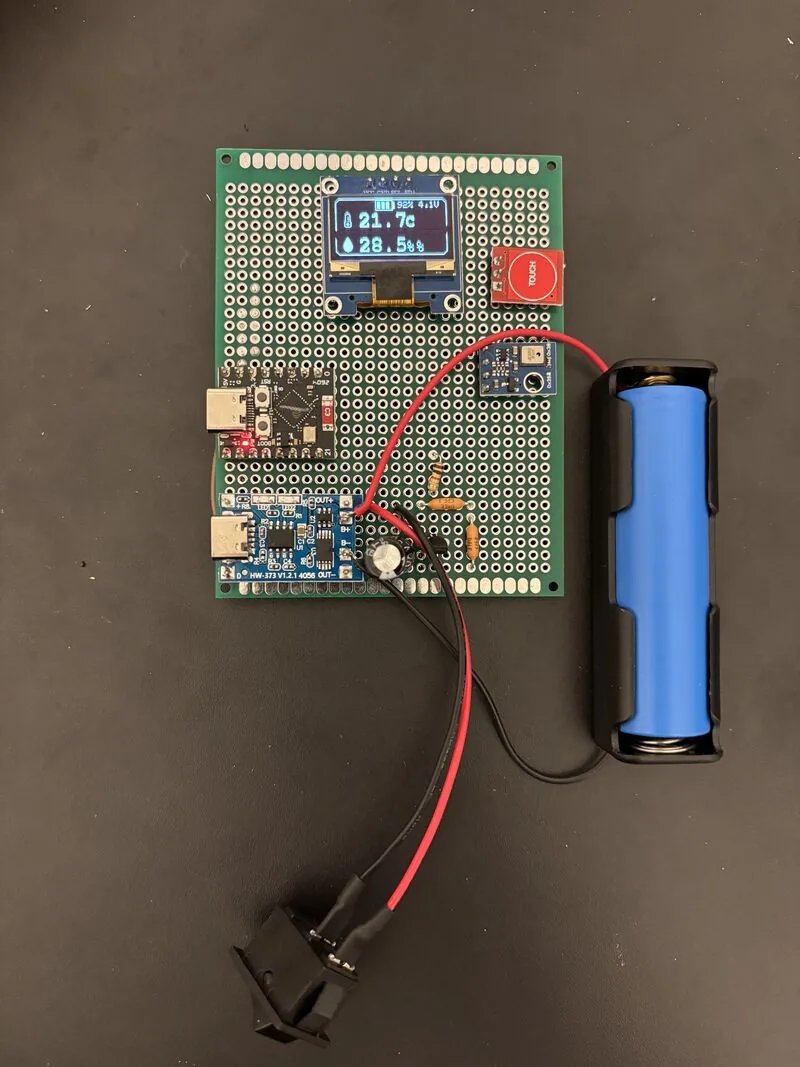
I built a small battery-powered display for indoor temperature and humidity. It uses an ESP32-C3 Super Mini, an AHT10 sensor, a 0.96-inch OLED, and a single 18650 cell. A touch button wakes the display, and the board sleeps between checks. The parts for the original build cost less than €10.
What I wanted it to do#
This was a small project to bring a sensor, a display, and battery power together. I wanted to be able to tap it, read the room temperature and humidity, and leave it alone again.
The finished prototype sits on perfboard. It has no weather service or network connection; the readings come from the sensor beside the board. Most of the interesting work turned out to be in startup, sleep, and power handling rather than drawing the numbers.
The original AHT10 build#
The AHT10 and OLED share an I²C bus. The sensor uses address 0x38, and the display uses 0x3C.
| Part | Role in the build |
|---|---|
| ESP32-C3 Super Mini | Reads the sensor and controls the display |
| AHT10 | Measures temperature and humidity |
| SSD1306 128×64 OLED | Shows readings and battery state |
| 18650 cell and holder | Battery supply |
| TP4056 module with protection | Charging and cell protection |
| TTP223 touch module | Wake and sleep input |
| 2N2222 transistor | Switches the OLED's ground connection |
| Resistor divider | Brings battery voltage into the ADC range |
| 1000 µF capacitor | Added across the supply rails during debugging |
I later substituted a DHT11 when I ran out of AHT10 modules. That is why the current sketch contains DHT code. The build described here is the original AHT10 version; the later sensor needs different wiring and a different read function.
Waking up and going back to sleep#
The touch module supplies a digital signal to the ESP32. After a wake-up, the firmware waits for the touch to be released before accepting another one. Otherwise the same finger press could wake the display and immediately send it back to sleep.
While awake, the screen refreshes every two seconds. A second touch puts the board to sleep, and the current firmware also ends the display session after 30 seconds.
There are two wake sources: the touch input and a five-minute timer. The timer goes through the same display session as a manual wake, so it is not silently recording a long-term temperature history. The sketch reads and displays the current conditions.
The main flow is small enough to follow in one pass:
Wake from touch or timer
          |
          v
Wait for touch release
          |
          v
Power the OLED and read sensors
          |
          v
Refresh while the display is awake
          |
          v
Turn off OLED and enter deep sleep
The current sketch runs that sequence in setup(). Deep sleep starts another boot when it ends, so the ordinary Arduino loop() is not used.
Switching the display off#
Before sleeping, the firmware sends the SSD1306 display-off command and switches the transistor controlling the OLED's ground connection. The aim was to reduce the display's contribution to idle current as well as stop drawing the screen.
I would not describe the whole device as drawing zero current in sleep. The touch module, regulator, charger/protection board, voltage divider, and any remaining leakage all affect the battery. A sleep call in the firmware is only one part of that picture.
Measuring current at the battery through a complete wake-and-sleep cycle would be the next useful power test. I do not have a measured battery-life figure to attach to this version.
The startup problem#
The first assembly kept cutting out when I connected the ESP32 through the protected charging module. My working explanation was that the startup current and supply behaviour were triggering the protection circuit.
Adding a 1000 µF capacitor across the supply rails stopped those startup resets in this build. That was the practical result I needed to continue testing the display and sleep behaviour.
I would keep that observation separate from a general rule about TP4056 modules. The result depends on the particular cell, protection board, wiring, and load. A capacitor can help support a brief load change, but its own charging also affects startup.
The prototype feeds the battery output into the development board's onboard regulator through its 5 V input. For another board revision, I would check the regulator's behaviour as the cell discharges rather than assume the full cell-voltage range will remain usable.
Reading the battery#
The ADC reads the cell through two 100 kΩ resistors. With equal resistors, the measured voltage is half the battery voltage, so the calculation multiplies it back by two.
The current sketch averages 16 samples and applies a calibration factor of 0.923. That factor belongs to this measurement setup; it is not a general ESP32-C3 constant.
The displayed percentage is a linear estimate between 3.0 V and 4.2 V, with values outside that range clamped to 0 or 100. It is useful as a rough indicator, but it is not a calibrated measurement of remaining capacity. I kept the voltage on screen alongside the percentage so I could see the value behind it.
Fitting the readings on the OLED#
The screen is 128×64 pixels. Temperature and humidity each get a large number, a small bitmap icon, and a unit label. The battery outline, fill bars, percentage, and voltage sit at the top.
I used FreeMonoBold for the main readings and smaller text for the battery. There is little room, but the information is simple enough that it does not need menus or several pages.
The original parts total was under €10. I treated that as the cost of this particular build, not a fixed shopping list that will cost the same everywhere.
What I would change#
I would start by measuring the actual sleep and awake current, checking the battery reading against a meter, and making a small enclosure. I would also reconsider whether the timer needs to turn the display on when nobody is looking at it.
The prototype already does the thing I wanted: a quick local reading on a battery-powered screen. The next improvements are about making that behaviour more predictable and finding out how long it can run between charges.