How I built a web server in C from scratch
On this page 8 sections
Implementation of the HTTP protocol in C: from basic web content serving to compression, security, and REST architecture#
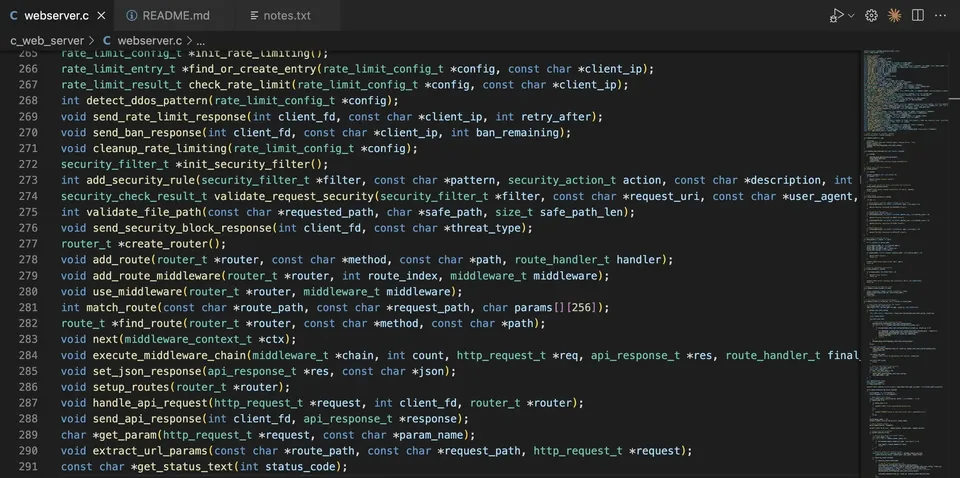
Recently, I have been looking into projects that would help me practice my C skills and better understand low-level programming, and as a web developer, I thought, “Why not build a functional web server in C from scratch? This should be possible, right?”
The idea was to implement a functional web server in C and, in the process, gain a better understanding of the pillars of the HTTP protocol and how higher-level abstraction layers are built.
And after digging into the HTTP protocol and implementing it layer by layer, I have managed to create a C web server that parses requests, sends responses, files (with compression), as well as touches on security and REST architecture for API calls.
So essentially, the web server implements the following layers: network, threading, request parsing, MIME, file serving, response generation, API routing, and utility. Let’s get into each of these layers and their functionalities:
1. Network layer#
The network layer is the foundation of the web server. Before we can even think about parsing HTTP requests or serving files, we need a way for clients (like browsers or API consumers) to talk to our program. This is where sockets come in.
A socket is an endpoint for communication between two machines over a network. When you type a URL in your browser, the browser creates a socket to the server’s IP address and port (for example, localhost:3000), and sends an HTTP request through that socket. The server, on the other hand, must have a socket listening on that port so it can receive the request.
int create_socket()
{
    int sockfd = socket(AF_INET, SOCK_STREAM, 0);
    if (sockfd < 0) {
        perror("Socket creation failed");
        return -1;
    }

    // Set options like reuseaddr, buffers, keepalive
    setup_socket_options(sockfd);

    printf("[INFO] Socket created successfully (fd: %d)\n", sockfd);
    return sockfd;
}
And a loop for accepting connections:
while (server_running) {
    client_fd = accept(server_fd, (struct sockaddr *)&client_addr, &client_len);
    if (client_fd < 0) continue;

    pthread_t thread;
    client_connection_t *conn = malloc(sizeof(client_connection_t));
    conn->client_fd = client_fd;
    conn->client_addr = client_addr;
    pthread_create(&thread, NULL, handle_client_thread, conn);
    pthread_detach(thread);
}
In practical terms, the network layer of my web server takes care of:
- Creating the socket – calling the
socket()system call to get a file descriptor that represents the server’s communication channel. - Binding the socket to an address and port – associating it with a specific IP address (in this case
0.0.0.0, meaning “all network interfaces”) and a port (e.g.,3000). Without binding, the operating system doesn’t know where to send incoming requests. - Listening for connections – putting the socket into “listening” mode with
listen(), which allows it to queue incoming client connections until the server accepts them. This is where we define a backlog, meaning how many pending connections we can handle before new ones get dropped. - Accepting client connections – once a client tries to connect, the server calls
accept(), which returns a new socket dedicated to communicating with that client. This design allows the server’s main socket to keep listening for new clients, while separate sockets handle active conversations.
Why this matters:
- Without this layer, the server has no way of talking to clients. It’s essentially the “physical handshake” where the browser and the server first meet.
- This is also where performance and reliability start: for example, we set socket options like
SO_REUSEADDR(so the server can restart quickly without waiting for the OS to free the port) or enable keep-alive connections (so a client doesn’t need to reconnect for every single request).
So you can think of the network layer as the plumbing of the web server. It establishes the channels over which HTTP messages will flow. Higher layers like request parsing, file serving, or API routing only make sense once this foundation is in place.
2. Threading layer#
Once the server can accept incoming connections, the next challenge is: how do we handle multiple clients at the same time?
A basic single-threaded server can only talk to one client at once. That means if client A is downloading a large file, client B has to wait until the transfer finishes before its request is even processed. Clearly, that doesn’t scale — especially for a web server, where dozens (or thousands) of clients may connect simultaneously.
This is where the threading layer comes in.
void *handle_client_thread(void *arg)
{
    client_connection_t *conn = (client_connection_t *)arg;
    handle_client(conn->client_fd, conn->client_addr);
    free(conn);
    return NULL;
}
Inside handle_client() you can see one thread per client:
while (keep_connection && server_running) {
    ssize_t bytes_read = recv(client_fd, buffer, sizeof(buffer) - 1, 0);
    if (bytes_read <= 0) break;

    parse_request(buffer, &request);
    ...
}
In my implementation, every time a new client connects, the server creates a separate thread dedicated to handling that client. This has a few key benefits:
- Concurrency – Each client gets its own execution path. While one thread is waiting on I/O (for example, reading a file from disk), other threads can keep processing requests. This dramatically improves responsiveness.
- Isolation – Since each client runs in its own thread, a slow client won’t block the others.
- Simplicity – Each thread can follow the same “read request → process → send response” workflow, without complicated event loops.
Of course, threading introduces its own challenges, and that’s why the design has to consider:
- Dynamic thread creation – A new thread is created for each connection. To avoid memory leaks, threads are detached once they finish their work so the operating system can clean up their resources automatically.
- Resource management – Each thread only owns its client’s file descriptor, and once the connection closes, it’s freed. This ensures that resources like sockets, buffers, and memory allocations don’t pile up.
- Concurrency control – Some parts of the server (like rate limiting or security filters) need shared state across all clients. To avoid race conditions (two threads modifying shared data at the same time), we use synchronization primitives like mutexes to ensure safe access.
Therefore:
- Threading transforms the server from a toy project into something closer to a real-world web server.
- It’s what allows the server to scale from “serving one client at a time” to “serving many clients simultaneously,” which is essential for web workloads.
You can think of the threading layer as the traffic controller of the server: every incoming car (client) gets its own lane (thread), so traffic flows smoothly without everyone being stuck behind a single slow vehicle.
3. HTTP protocol - request parsing#
Now that the server can accept connections (network layer) and handle them concurrently (threading layer), the next step is to actually understand what the client is asking for. That’s the job of the HTTP protocol layer.
Whenever a browser (or client) sends a request, it looks something like this:
GET /index.html HTTP/1.1
Host: localhost:3000
User-Agent: Mozilla/5.0
Accept: text/html
Connection: keep-alive
At the raw network level, this is just a chunk of text. The request parsing logic is responsible for:
- Breaking down the request line
The very first line (
GET /index.html HTTP/1.1) tells us the method (GET), the path (/index.html), and the protocol version (HTTP/1.1). These three pieces define what the client wants. - Extracting headers
The following lines are key-value pairs (e.g.,
Host,Accept,Connection). Parsing them properly lets the server decide:- What type of response does the client accept (
Acceptheader). - Whether to keep the connection open after the response (
Connection: keep-alive). - Client metadata like
User-AgentorAccept-Language.
- What type of response does the client accept (
- Handling the request body
For methods like
POST, the request may contain a body (e.g., form data or JSON). The parser reads that into memory so higher layers can process it. - Keep-alive detection By default, HTTP/1.0 closes the connection after each request, while HTTP/1.1 assumes persistent connections unless told otherwise. The parser checks the protocol version and headers to decide if the same socket should stay open for further requests. This improves efficiency by avoiding reconnects for every request.
- Supported methods
For simplicity, my server implements the three most common methods:
GET– fetches and returns a resource.HEAD– returns only the headers (useful for metadata checks).POST– allows clients to send data (e.g., form submissions).
Why this matters:
- HTTP parsing is the translation step — turning raw text into a structured format that the server can work with.
- Without it, the server wouldn’t know if the client wants a web page, an image, or to send data to an API.
- Correct parsing is also the foundation for security: many attacks (like path traversal or header injection) try to exploit parsing mistakes.
void parse_request(char *raw_request, http_request_t *request)
{
    sscanf(line, "%15s %511s %15s",
           request->method, request->path, request->version);

    // HTTP/1.1 defaults to keep-alive
    if (strstr(request->version, "1.1"))
        request->keep_alive = 1;

    while ((line = strtok(NULL, "\r\n")) != NULL && strlen(line) > 0) {
        char *colon = strchr(line, ':');
        ...
        if (strcasecmp(line, "Connection") == 0) {
            if (strcasecmp(value, "close") == 0) request->keep_alive = 0;
            else if (strcasecmp(value, "keep-alive") == 0) request->keep_alive = 1;
        }
    }
}
So you can think of the HTTP protocol layer as the interpreter between the client and the server’s internal logic. It takes unstructured text and gives the server a clear instruction: what to serve, how to serve it, and whether to keep talking afterward.
4. MIME Type System#
Once the server can understand requests and locate the right file, the next question is: how does the browser know what kind of content it’s receiving?
That’s where the MIME type system comes into play.
MIME (Multipurpose Internet Mail Extensions) types are essentially labels that describe the nature of a file. For example:
.html→text/html.css→text/css.js→application/javascript.png→image/png
When the server sends a response, it includes a header like:
Content-Type: text/html; charset=utf-8
This tells the browser “interpret this file as an HTML document” rather than, say, plain text or a binary file. Without this information, the browser wouldn’t know whether to render content as a web page, show it as an image, or just prompt a download.
In my implementation, the MIME system works like this:
- File extension lookup
The server examines the requested file’s extension (
.html,.css,.jpg, etc.) and maps it to a known MIME type. If the extension isn’t recognized, it falls back to a safe default:application/octet-stream(generic binary data). - Supported formats
I’ve included the most common file types needed for a basic website or API:
- Web documents: HTML, CSS, JavaScript, JSON
- Images: PNG, JPEG, GIF, SVG, ICO
- Other formats: plain text, PDF, ZIP archives
- Integration with response generation
When the server builds the HTTP response, it attaches the correct
Content-Typeheader so the client can render or handle the content appropriately.
mime_type_t mime_types[] = {
    {".html", "text/html"},
    {".css", "text/css"},
    {".js", "application/javascript"},
    {".png", "image/png"},
    {".jpg", "image/jpeg"},
    {NULL, "application/octet-stream"}
};

char *get_mime_type(char *filepath)
{
    char *extension = strrchr(filepath, '.');
    if (!extension) return "application/octet-stream";

    for (int i = 0; mime_types[i].extension != NULL; i++) {
        if (strcasecmp(extension, mime_types[i].extension) == 0)
            return mime_types[i].mime_type;
    }
    return "application/octet-stream";
}
Why this matters:
- The MIME type system ensures the browser knows how to process the response.
- It’s a small but critical piece of the web server puzzle — without it, your browser might try to download an HTML file instead of displaying it.
- It also helps with security, because serving files with the wrong MIME type can lead to attacks like MIME sniffing (where the browser misinterprets the file type).
So essentially, the MIME type system is the translator’s label — it tells the client “this is an image,” “this is a script,” or “this is a web page,” so everything on the web loads and behaves as expected.
5. File serving layer#
At its core, a web server is often just a file server — it takes a request like /index.html and returns the corresponding file from disk.
The file serving layer handles this, but it must do so safely and efficiently:
- File system access
The server takes the requested path (e.g.,
/images/logo.png), sanitizes it, and constructs a safe file path within the document root. This prevents attacks like path traversal (../etc/passwd) where malicious clients try to escape the web directory. - Content delivery Files are read from disk and streamed back to the client in chunks. This is crucial for efficiency: instead of loading a huge file entirely into memory, the server can read and send it piece by piece.
- Error handling
If a file doesn’t exist, isn’t a regular file, or can’t be opened due to permissions, the server responds with the appropriate HTTP error page (
404 Not Found,500 Internal Server Error, etc.). - Compression For text-based content (HTML, CSS, JS, JSON), the server can apply gzip compression before sending the file. This reduces bandwidth usage and speeds up delivery, especially for larger resources.
void send_file(int client_fd, char *filepath, int keep_alive, http_request_t *request)
{
    struct stat file_stat;
    if (stat(filepath, &file_stat) < 0) {
        send_404(client_fd, keep_alive);
        return;
    }

    negotiated_content_t content = negotiate_content(filepath, request);

    // Send headers first
    send_response(client_fd, HTTP_200, &content, NULL, file_stat.st_size, keep_alive);

    // Then stream file in chunks
    safe_send_file(client_fd, file_fd, file_stat.st_size);
}
The file serving layer is where the server turns requests into actual content delivery. It’s what makes the difference between a functional website and just an HTTP “echo server.”
6. HTTP protocol layer – Response generation#
Once the server has the content ready (from a file or API), it needs to send back a valid HTTP response. This layer ensures that responses follow the HTTP/1.1 standard and communicate the right metadata to the client.
- HTTP response format
Every response has a status line (e.g.,
HTTP/1.1 200 OK), headers (e.g.,Content-Type,Content-Length), and optionally a body. The server builds this structure carefully so clients can parse it without error. - Status code management
Different scenarios require different codes:
200 OK– file found and served404 Not Found– file doesn’t exist400 Bad Request– malformed request500 Internal Server Error– something went wrong on the server Each status is paired with an explanatory HTML page (for human-friendly error messages).
- Safe transmission Sending data over sockets isn’t always straightforward: sometimes only part of the buffer is sent, or network errors occur. The server uses a safe send function to retry partial writes and handle errors gracefully, ensuring clients receive the full response.
void send_response(int client_fd, char *status,
                   negotiated_content_t *content,
                   char *body, size_t body_length, int keep_alive)
{
    char response[BUFFER_SIZE];
    char time_str[128];
    get_current_time(time_str);

    int header_length = snprintf(response, sizeof(response),
        "HTTP/1.1 %s\r\n"
        "Date: %s\r\n"
        "Server: CustomWebServer/1.0\r\n"
        "Content-Type: %s; charset=%s\r\n"
        "Content-Length: %zu\r\n"
        "Connection: %s\r\n\r\n",
        status, time_str, content->content_type, content->charset,
        body_length, keep_alive ? "keep-alive" : "close");

    safe_send(client_fd, response, header_length);
    if (body && body_length > 0) safe_send(client_fd, body, body_length);
}
The response generation layer is what makes the server standards-compliant. Without proper headers and status codes, browsers wouldn’t know how to render pages, cache resources, or handle errors.
7. API routing layer#
Serving static files is only half the story. Modern web servers also power APIs, where clients make structured requests (often JSON) and expect structured responses.
The API routing layer provides this capability:
- Route matching
Instead of mapping directly to files, the server can match request paths to handler functions. For example:
GET /api/users→ returns a list of usersPOST /api/login→ processes authentication Pattern-based routing also allows parameters (e.g.,/api/users/:id).
- Middleware system
Middleware functions run before the final route handler. They can be global (applied to all routes) or route-specific. Typical use cases:
- Logging requests
- Adding CORS headers
- Authentication checks
- JSON handling
APIs often exchange JSON, so the server includes helpers to automatically set the
Content-Type: application/jsonheader and format responses correctly. - RESTful architecture
Different HTTP methods are supported (
GET,POST,PUT,DELETE), allowing the server to follow REST conventions for CRUD operations.
// Route definition
typedef struct {
    char method[8];
    char path[256];
    route_handler_t handler;
} route_t;

void setup_routes(router_t *router) {
    add_route(router, "GET", "/api/users", get_users);
}

// Example handler
api_response_t get_users(http_request_t *req, api_response_t *res)
{
    set_json_response(res,
      "{\"users\": [{\"id\":1, \"name\":\"John\"}, {\"id\":2, \"name\":\"Jane\"}]}");
    return *res;
}
With routing and JSON handling, the server evolves beyond static hosting into a platform for dynamic applications and services.
8. Utility layer#
Finally, there’s a set of supporting utilities that make the whole server robust, safe, and user-friendly.
- URL decoding
Requests often contain percent-encoded characters (e.g.,
%20for spaces). The utility layer decodes these so paths like/My%20File.txtresolve correctly. - Time formatting
HTTP requires timestamps in GMT format (e.g.,
Sat, 20 Sep 2025 14:35:00 GMT). The utility functions generate these consistently for headers likeDateorRetry-After. - Signal handling
Servers run indefinitely, but they need to shut down cleanly on signals like
Ctrl+C. The utility layer installs signal handlers to:- Close sockets
- Clean up threads
- Free allocated resources This prevents resource leaks and ensures a graceful exit.
- Security, rate limiting, and DDoS protection
The server includes protections like:
- Rate limiting: restricting how many requests a single client can make in a time window.
- DDoS detection: monitoring patterns like bursts of requests or too many active IPs.
- Security filters: blocking malicious patterns (SQL injection, XSS, path traversal).
// URL decoding
void url_decode(char *dst, const char *src)
{
    while (*src) {
        if (*src == '%' && src[1] && src[2]) {
            char hex[3] = {src[1], src[2], '\0'};
            *dst++ = (char)strtol(hex, NULL, 16);
            src += 3;
        } else if (*src == '+') {
            *dst++ = ' ';
            src++;
        } else {
            *dst++ = *src++;
        }
    }
    *dst = '\0';
}

// HTTP time formatting
void get_current_time(char *buffer)
{
    time_t now = time(NULL);
    struct tm *gmt = gmtime(&now);
    strftime(buffer, 128, "%a, %d %b %Y %H:%M:%S GMT", gmt);
}
Why this matters:
The utility layer may seem secondary, but it’s what transforms a “barebones” server into a production-ready system that can survive real-world conditions.
Building this web server in C from scratch was not just about getting something to run — it was about learning how the web really works beneath the abstractions. By reimplementing the different layers (from sockets to threading, HTTP parsing, MIME handling, file serving, API routing, and security), I was able to see firsthand how higher-level frameworks and servers are constructed on top of these low-level building blocks.
This project wasn’t meant to compete with production-ready servers like Nginx or Apache — instead, it was a way to deepen my understanding of C, networking, and the HTTP protocol itself. Along the way, I learned how much detail goes into even the simplest features we take for granted when using modern frameworks.
If you’re curious, you can check out the full source code and experiment with it yourself:
I hope this breakdown inspires you to dive deeper into low-level programming projects of your own. Sometimes the best way to understand the tools we use every day is to rebuild them from scratch.